
In this article, we will explore how to implement payload validation in your integration flow, why it is important, and where in the integration landscape such validations should be applied when it comes to integration involving SAP S4 HANA. We will then take a deep dive into the configuration options of the XML Validator and look at different ways to model an iFlow using it. Furthermore, we will discuss how to return validation results to the message sender and how to enhance message monitoring for invalid XML payloads. Finally, we will look into a possible workaround for validating JSON messages.
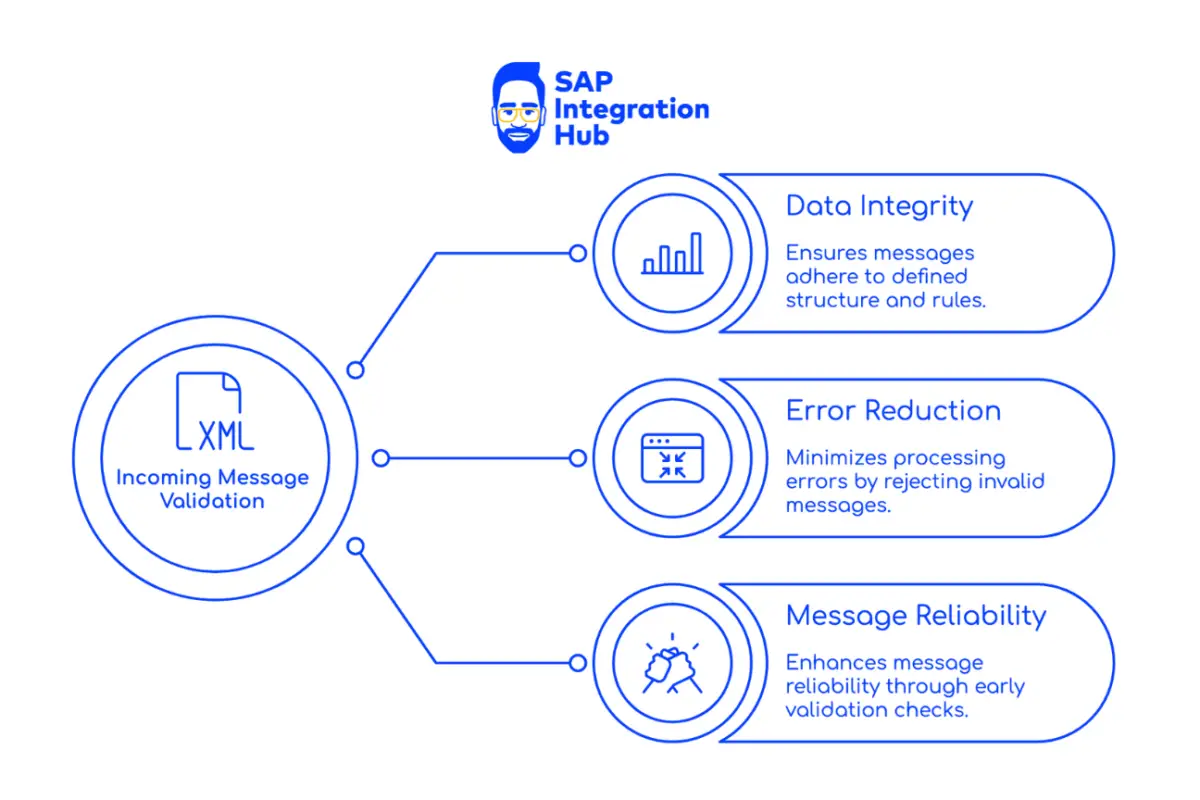
Message Validation in System Integration, Why It Matters
When it comes to system integration, one of the most important steps before message processing begins is ensuring that the incoming message is valid.
This means checking:
- Is the message format correct?
- Does it match the defined schema?
- Are all mandatory elements required for processing available?
- Do fields contain data with correct length and data type?
- Are there invalid characters?
- Do field values fall within an acceptable or expected range?
These are critical checks to perform before continuing with the pipeline. Without proper validation, you may encounter unexpected behavior during later stages of message processing.
Where Should Message Validation Take Place?
In an enterprise integration landscape, there is typically a middleware layer—such as SAP Integration Suite—between the sender and the receiver. If the receiver system is an ERP system like SAP S/4HANA, you could technically perform validation there using tools such as SAP AIF (Application Integration Framework).
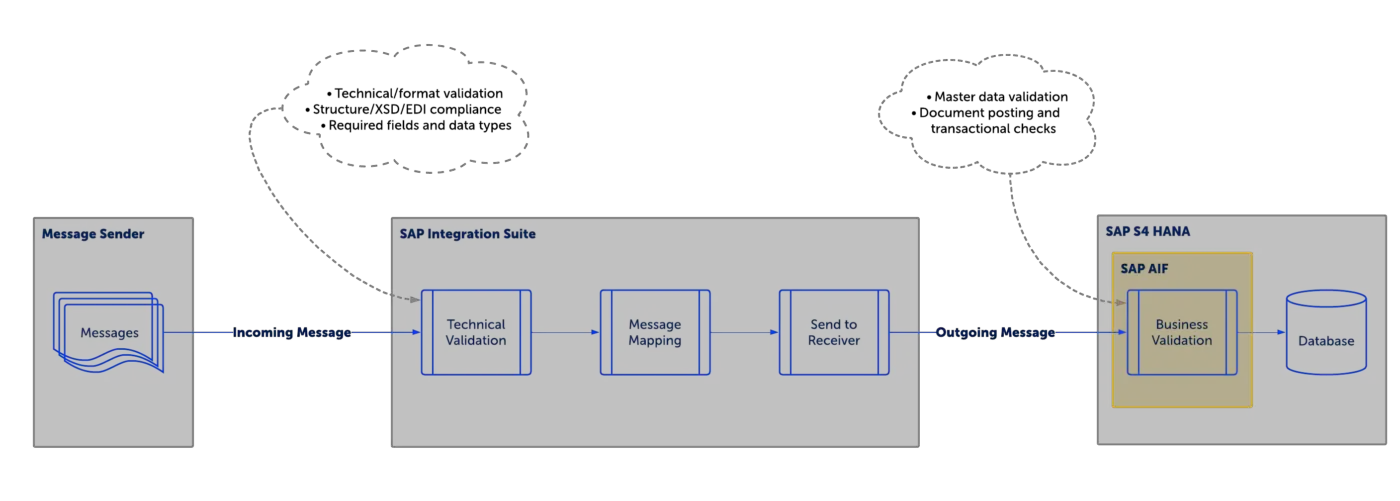
However, it is important to assign responsibilities to the right components in your architecture. The receiver system should not be burdened with all validations, especially structural validations like checking XML format against schema. Doing such validations at the receiver means writing unnecessary and often complex backend logic.
Structural validation is best handled in the middleware, as it is the first line of defense.
On the other hand, business validations—such as checking whether an order type, warehouse code, or material exists—should ideally be performed in the receiver system, since that system owns the business data.
A balanced approach is recommended:
| Validation Type | Where to Validate | Reason |
|---|---|---|
| Structural validations (XSD compliance, format, mandatory fields, datatype etc.) | Middleware | Prevent processing invalid payload early |
| Business validations (order type exists, material code valid etc.) | Receiver system (e.g. S/4HANA) | Requires master data available only in backend |
Message Validation in SAP Integration Suite
SAP Integration Suite provides multiple ways to perform payload validation. You may use:
- XML Validator palette option
- EDI Validator
- Groovy scripts
- XPath expressions
- Filter step logic
- Other validation options depending on the scenario
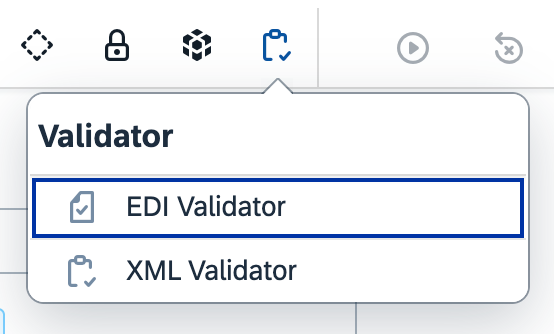
The recommended first approach is to use standard palette steps. For structural validations, SAP Integration Suite provides XML Validator and EDI Validator out-of-the-box.
In this article, we will focus on the XML Validator, how to configure it, how it behaves, and how to handle payload validation results in your iFlow.
Prerequisits for Implmenting XML Validator in SAP Integration Suite
It goes without saying that you need to have the incoming XML message format as well as the corresponding XSD schema for the XML.
For this example, I have created an XML format that sends order information, and based on that, I have created the corresponding XSD schema. The XSD defines all validation rules, and every incoming XML will be validated against it. We want to stop processing any XML that is invalid or does not comply with the XSD.
Incoming XML Format
<?xml version="1.0" encoding="UTF-8"?>
<SalesOrder>
    <!-- ===== Order Header ===== -->
    <Header>
        <CustomerID>VINET</CustomerID>
        <OrderDate>1996-07-04T00:00:00Z</OrderDate>
        <ShippedDate>1996-07-16T00:00:00Z</ShippedDate>
        <DocumentCurrency>EUR</DocumentCurrency>
        <PurchaseOrderNumber>PO-458922</PurchaseOrderNumber>
        <OrderStatus>Confirmed</OrderStatus>
    </Header>
    <!-- ===== Customer Information ===== -->
    <CustomerDetails>
        <CustomerName>Vins et alcools Chevalier</CustomerName>
        <ContactPerson>Jean Dupont</ContactPerson>
        <Email>[email protected]</Email>
        <Phone>+33-320-556-789</Phone>
        <BillingAddress>
            <AddressLine1>59 rue de l'Abbaye</AddressLine1>
            <City>Reims</City>
            <PostalCode>51100</PostalCode>
            <Country>France</Country>
        </BillingAddress>
    </CustomerDetails>

    <!-- ===== Shipping Information ===== -->
    <ShippingDetails>
        <ShipMethod>Express</ShipMethod>
        <ShipVia>3</ShipVia>
        <Freight>32.38</Freight>
        <ShipTo>
            <ShipName>Vins et alcools Chevalier</ShipName>
            <ShipAddress>59 rue de l'Abbaye</ShipAddress>
            <ShipCity>Reims</ShipCity>
            <ShipRegion></ShipRegion>
            <ShipPostalCode>51100</ShipPostalCode>
            <ShipCountry>France</ShipCountry>
        </ShipTo>
    </ShippingDetails>

    <!-- ===== Item/Order Lines ===== -->
    <Items>
        <Item>
            <LineNumber>1</LineNumber>
            <MaterialID>SKU-1001</MaterialID>
            <Description>Red Wine Premium</Description>
            <Quantity>50</Quantity>
            <Unit>EA</Unit>
            <UnitPrice>15.00</UnitPrice>
            <Discount>0.10</Discount>
            <NetAmount>675.00</NetAmount>
        </Item>

        <Item>
            <LineNumber>2</LineNumber>
            <MaterialID>SKU-2450</MaterialID>
            <Description>Champagne Brut</Description>
            <Quantity>20</Quantity>
            <Unit>EA</Unit>
            <UnitPrice>35.00</UnitPrice>
            <Discount>0.00</Discount>
            <NetAmount>700.00</NetAmount>
        </Item>
    </Items>

    <!-- ===== Order Summary ===== -->
    <Totals>
        <SubTotal>1375.00</SubTotal>
        <Tax>206.25</Tax>
        <ShippingCharges>32.38</ShippingCharges>
        <GrandTotal>1613.63</GrandTotal>
    </Totals>
</SalesOrder>
XSD Schama of the XML
<?xml version="1.0" encoding="UTF-8"?>
<xs:schema xmlns:xs="http://www.w3.org/2001/XMLSchema"
           elementFormDefault="qualified">

    <!-- ========= Root Element ========= -->
    <xs:element name="SalesOrder">
        <xs:complexType>
            <xs:sequence>
                <xs:element name="Header" type="HeaderType"/>
                <xs:element name="CustomerDetails" type="CustomerDetailsType"/>
                <xs:element name="ShippingDetails" type="ShippingDetailsType"/>
                <xs:element name="Items" type="ItemsType"/>
                <xs:element name="Totals" type="TotalsType"/>
            </xs:sequence>
        </xs:complexType>
    </xs:element>

    <!-- ========= Header Segment ========= -->
    <xs:complexType name="HeaderType">
        <xs:sequence>
            <xs:element name="OrderID" type="xs:string"/>
            <xs:element name="CustomerID" type="xs:string"/>
            <xs:element name="OrderDate" type="xs:dateTime"/>
            <xs:element name="RequiredDate" type="xs:dateTime" minOccurs="0"/>
            <xs:element name="ShippedDate" type="xs:dateTime" minOccurs="0"/>
            <xs:element name="DocumentCurrency" type="xs:string"/>
            <xs:element name="PurchaseOrderNumber" type="xs:string" minOccurs="0"/>
            <xs:element name="OrderStatus" type="xs:string" minOccurs="0"/>
        </xs:sequence>
    </xs:complexType>

    <!-- ========= Customer Info ========= -->
    <xs:complexType name="CustomerDetailsType">
        <xs:sequence>
            <xs:element name="CustomerName" type="xs:string"/>
            <xs:element name="ContactPerson" type="xs:string" minOccurs="0"/>
            <xs:element name="Email" type="xs:string" minOccurs="0"/>
            <xs:element name="Phone" type="xs:string" minOccurs="0"/>
            <xs:element name="BillingAddress" type="BillingAddressType"/>
        </xs:sequence>
    </xs:complexType>

    <xs:complexType name="BillingAddressType">
        <xs:sequence>
            <xs:element name="AddressLine1" type="xs:string"/>
            <xs:element name="City" type="xs:string"/>
            <xs:element name="PostalCode" type="xs:string"/>
            <xs:element name="Country" type="xs:string"/>
        </xs:sequence>
    </xs:complexType>

    <!-- ========= Shipping Details ========= -->
    <xs:complexType name="ShippingDetailsType">
        <xs:sequence>
            <xs:element name="ShipMethod" type="xs:string" minOccurs="0"/>
            <xs:element name="ShipVia" type="xs:int"/>
            <xs:element name="Freight" type="xs:decimal" minOccurs="0"/>
            <xs:element name="ShipTo" type="ShipToType"/>
        </xs:sequence>
    </xs:complexType>

    <xs:complexType name="ShipToType">
        <xs:sequence>
            <xs:element name="ShipName" type="xs:string"/>
            <xs:element name="ShipAddress" type="xs:string"/>
            <xs:element name="ShipCity" type="xs:string"/>
            <xs:element name="ShipRegion" type="xs:string" minOccurs="0"/>
            <xs:element name="ShipPostalCode" type="xs:string"/>
            <xs:element name="ShipCountry" type="xs:string"/>
        </xs:sequence>
    </xs:complexType>

    <!-- ========= Line Items ========= -->
    <xs:complexType name="ItemsType">
        <xs:sequence>
            <xs:element name="Item" type="ItemType" minOccurs="1" maxOccurs="unbounded"/>
        </xs:sequence>
    </xs:complexType>

    <xs:complexType name="ItemType">
        <xs:sequence>
            <xs:element name="LineNumber" type="xs:int"/>
            <xs:element name="MaterialID" type="xs:string"/>
            <xs:element name="Description" type="xs:string"/>
            <xs:element name="Quantity" type="xs:decimal"/>
            <xs:element name="Unit" type="xs:string"/>
            <xs:element name="UnitPrice" type="xs:decimal"/>
            <xs:element name="Discount" type="xs:decimal" minOccurs="0"/>
            <xs:element name="NetAmount" type="xs:decimal"/>
        </xs:sequence>
    </xs:complexType>

    <!-- ========= Totals ========= -->
    <xs:complexType name="TotalsType">
        <xs:sequence>
            <xs:element name="SubTotal" type="xs:decimal"/>
            <xs:element name="Tax" type="xs:decimal"/>
            <xs:element name="ShippingCharges" type="xs:decimal" minOccurs="0"/>
            <xs:element name="GrandTotal" type="xs:decimal"/>
        </xs:sequence>
    </xs:complexType>

</xs:schema>
Basic Configuration of XML Validator
Let’s create an iFlow and validate the incoming XML against an XSD using the default configuration of the XML Validator. We will leave Prevent Exception on Failure unchecked.
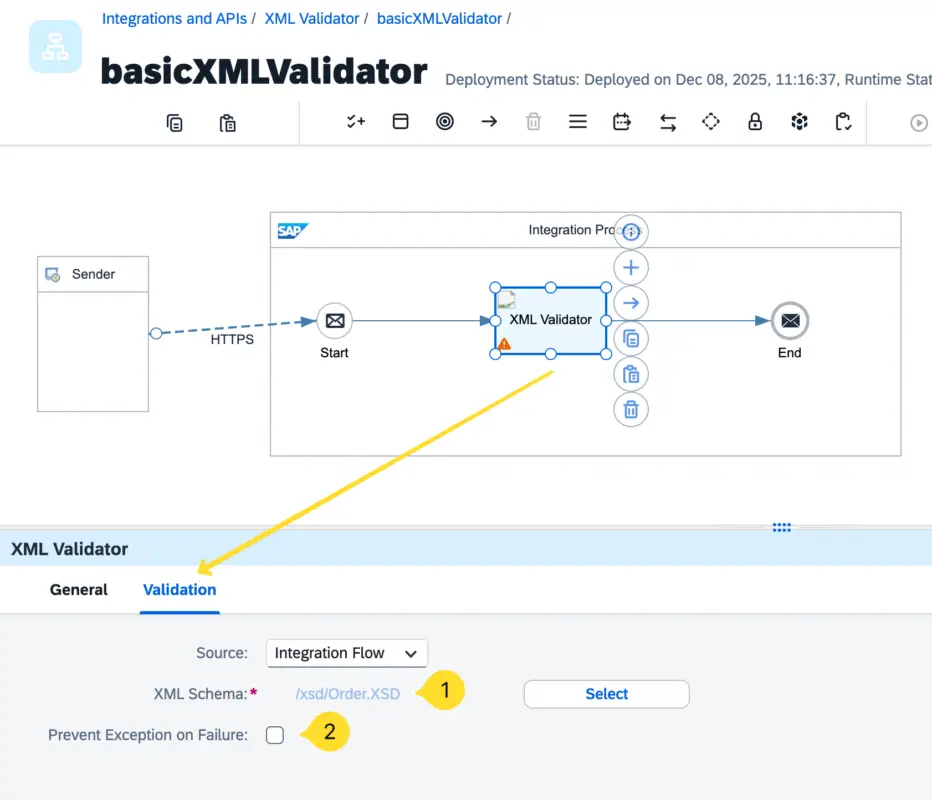
Upload the XSD file to the configuration option XML Schema option of the XML validator.
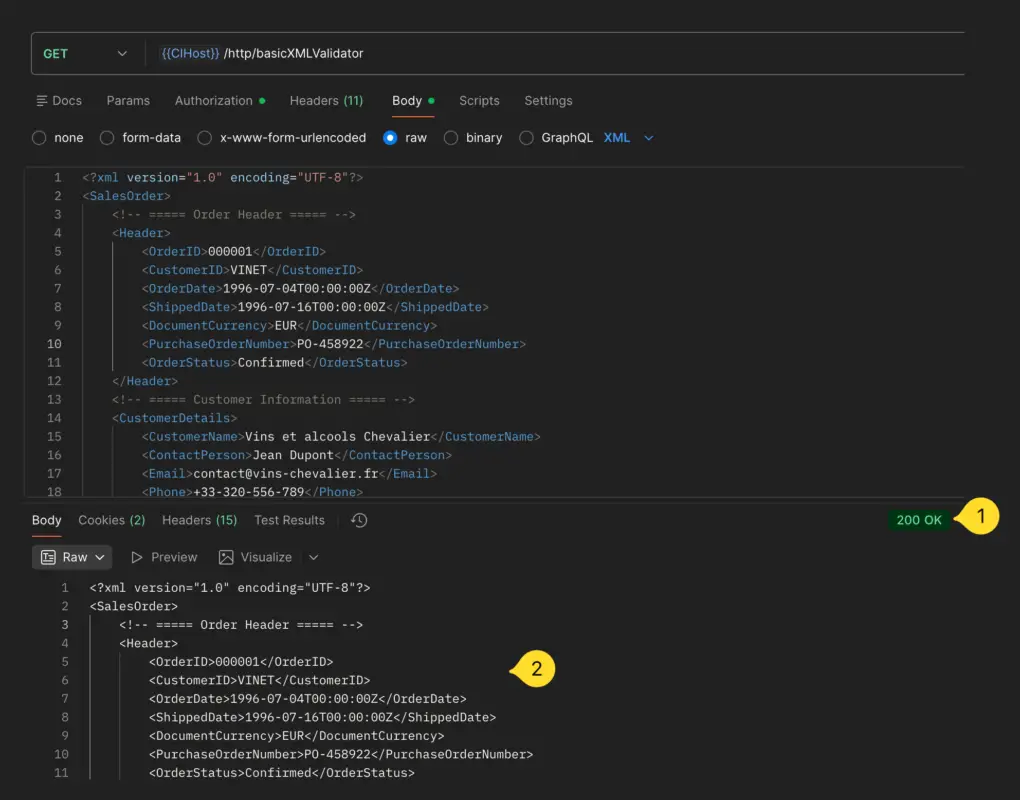
Test Scenario 1: Valid XML
When a valid XML is sent, the validator passes successfully and the message continues. Since we are not performing additional operations here, the same payload is returned as the response.
Test Scenario 2: Invalid XML
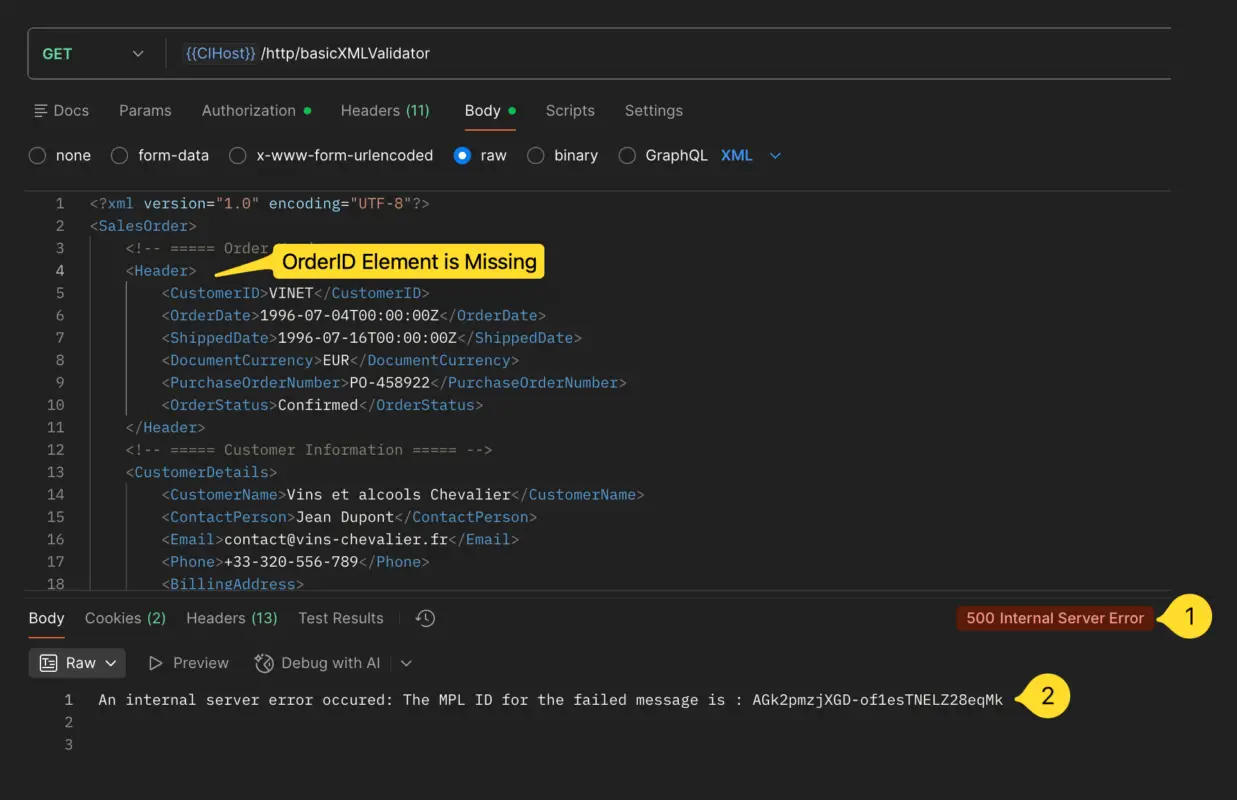
Now let’s remove a mandatory field (e.g., OrderID) and send the XML again.
This time the iFlow throws an exception, and the sender receives an HTTP 500 error with a generic MPL error response. It does not clearly indicate what went wrong.
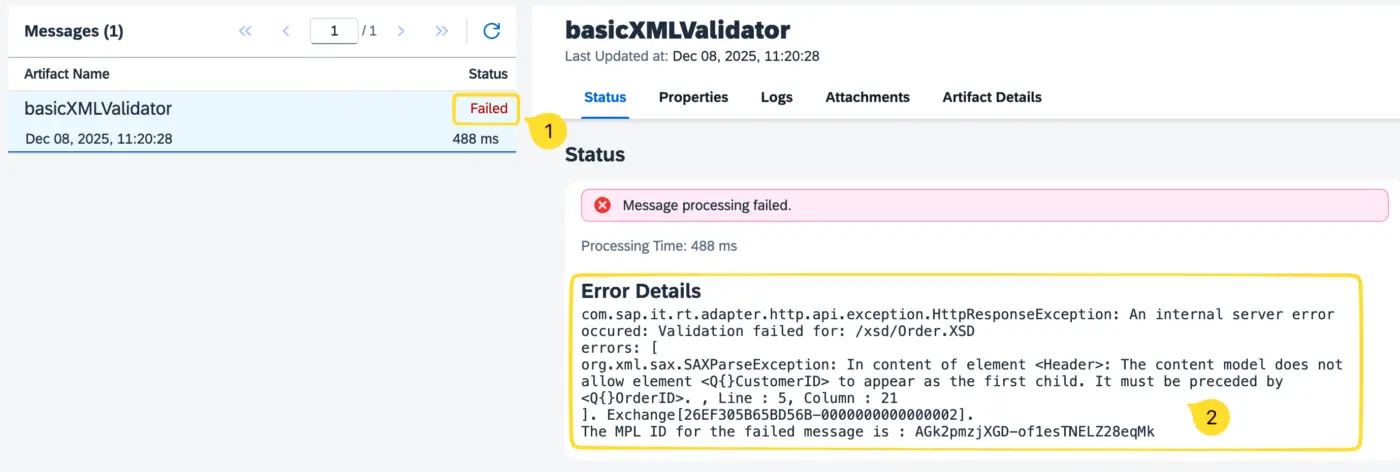
However, the message monitor shows detailed information stating exactly which field failed and why the validation did not pass.
To improve the experience, we should send a meaningful validation response back to the sender indicating:
- Whether validation succeeded or failed
- If failed, the exact reason
This helps the sender correct the payload and resend it. We will look at two variations of iFlows to do the same.
iFlow Variation 1 – XML Validation without Raising an Exception for Invalid XML Messages
Now, let’s enable Prevent Exception on Failure. With this option active, even if the XML is invalid, it will not throw an exception, allowing the message to continue through the iFlow.
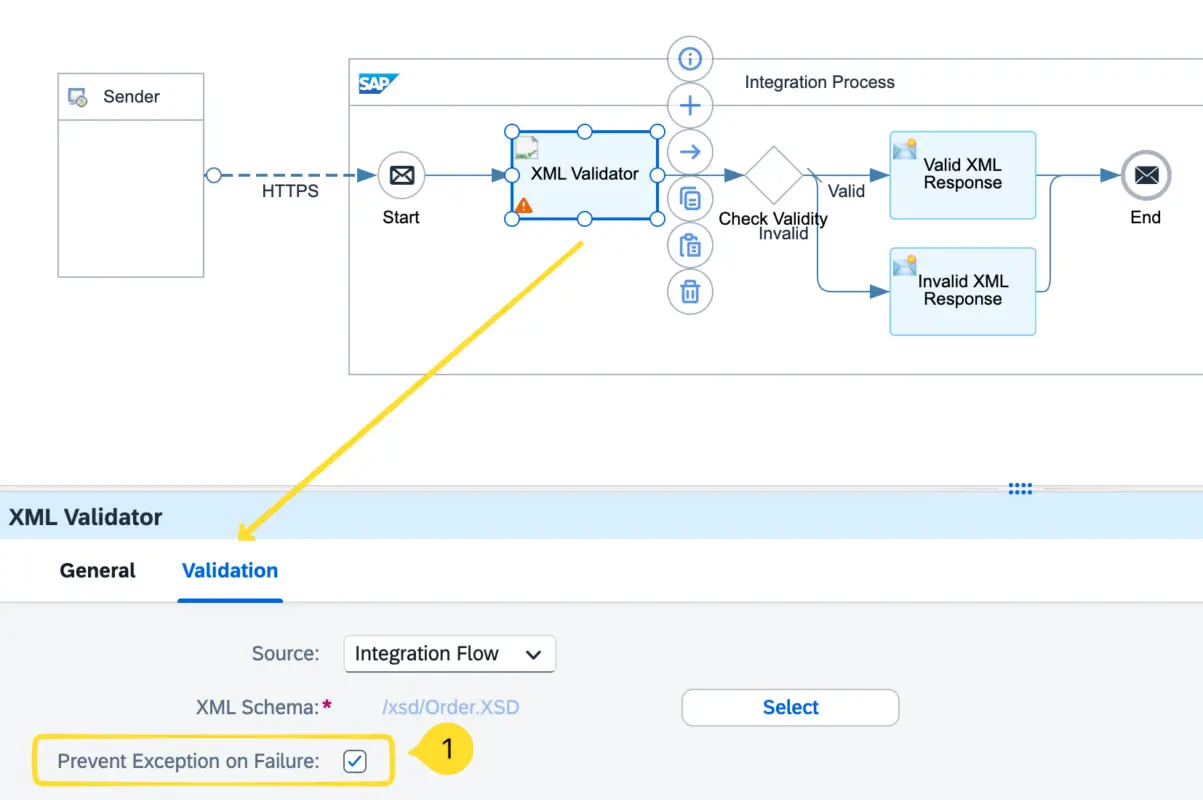
Integration Suite will store the Validation results in the header parameter: SAP_XmlValidationResult
- If the XML is valid →
SAP_XmlValidationResult = nullthat means XML is valid.
- if validation fails → this header contains the failure reason. Hence, the parameter
SAP_XmlValidationResultwill not be null.
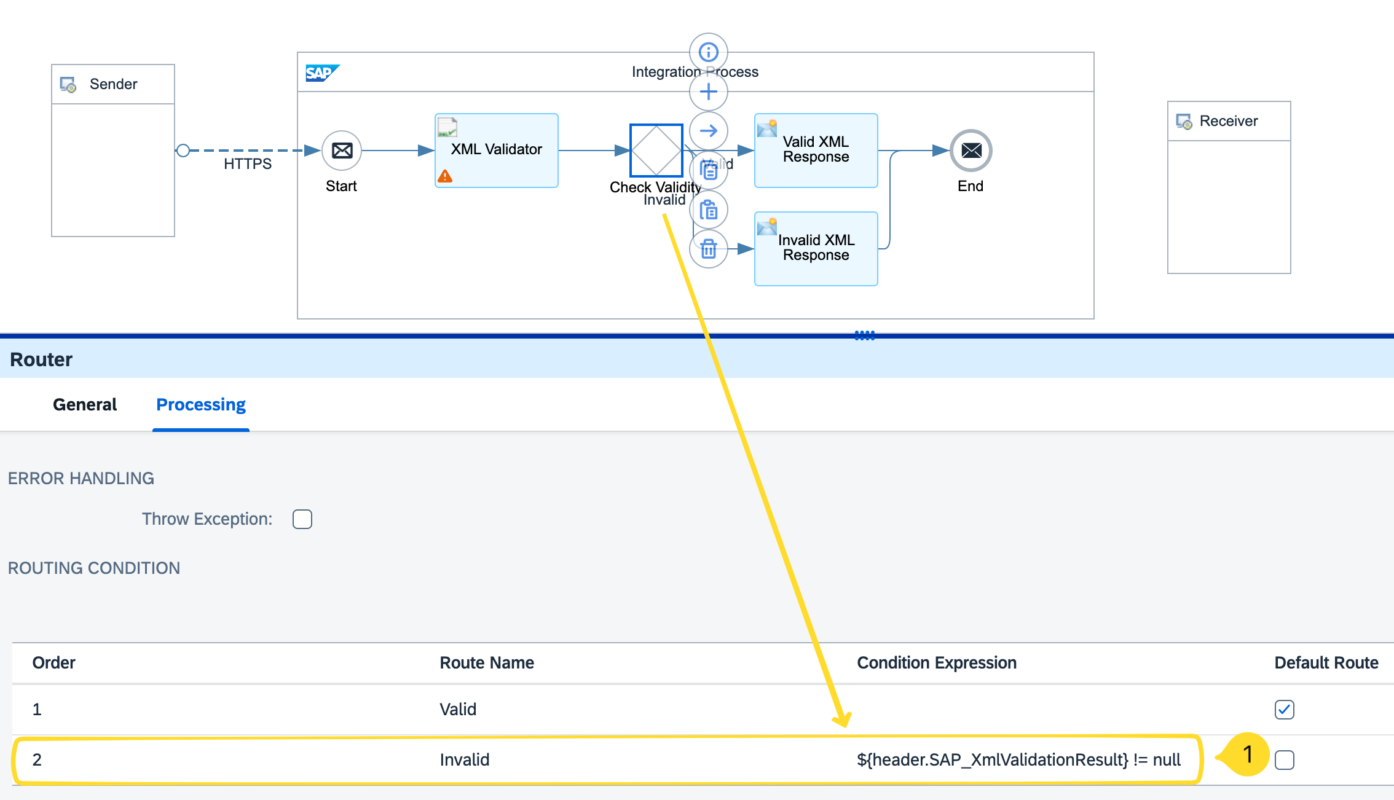
Using a Router with an expression such as: ${header.SAP_XmlValidationResult} != null we will create two routes to process valid XMLs and invalid XMLs.
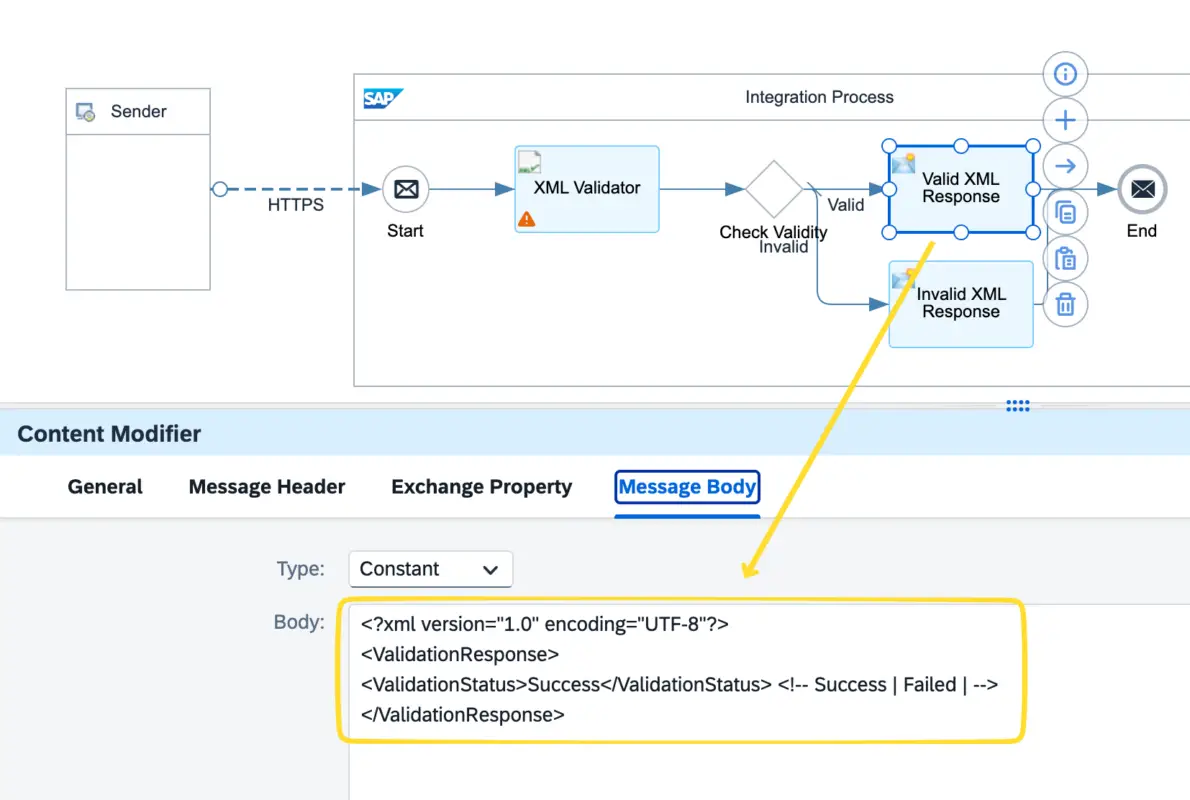
Now let’s configure the response back to the message sender. We will use content modifiers to set the response payload and return the status of the message validation.

In case of failure, it is recommended to return an appropriate HTTP status code to the message sender, preferably one from the 4xx series. For this example, if the message validation fails, we will return HTTP status code 400 (Bad Request) to clearly indicate that the incoming request was invalid.
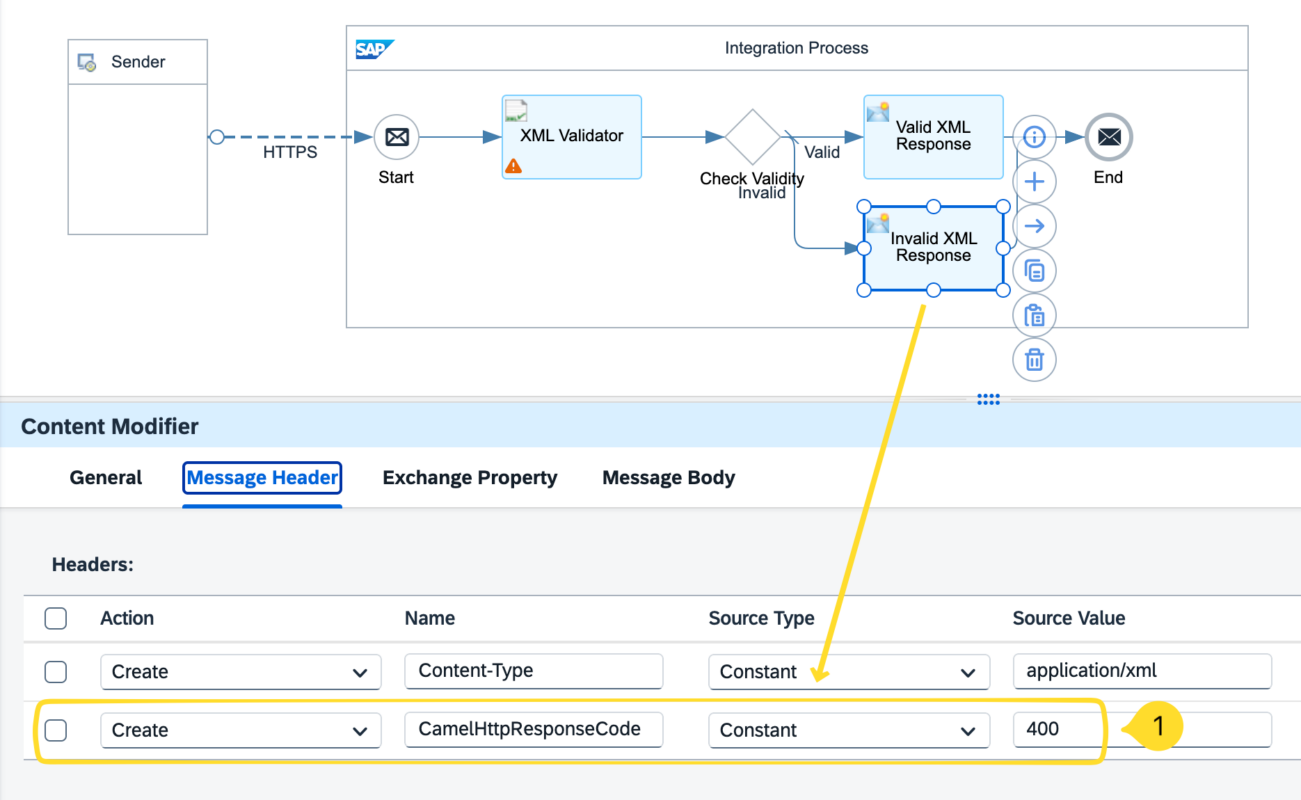
We can use the CamelHttpResponseCode header parameter to set the HTTP status code in the response message.
Now, let’s test the iFlow with both a valid and an invalid XML message.
Test Scenario 1 – Valid XML

Test Scenario 2 – Invalid XML

Learn how to implement payload validation in SAP Integration Suite iFlows using the XML Validator. This guide covers setup, configuration options, best practices for handling invalid XML messages, returning validation responses to senders, and even a workaround for validating JSON payloads. Perfect for integration developers looking to improve data quality and message reliability.
Notice that the message status in the message monitor will still appear as Successful or Completed even if the XML is invalid. This is because we prevented an exception from being raised for invalid XML messages and explicitly ended the processing using the End Message event.

This behavior is acceptable since, in end-to-end synchronous scenarios, it is the responsibility of the message-sending system to correct the payload and resend the request. We have already returned the error details to the sender, enabling them to take corrective action.
iFlow Variation 2 – Raise an Exception for Invalid Message and Handle them in the Exception Sub Process

Now let’s uncheck the Prevent Exception on Failure option. This will allow the XML Validator to throw an exception if the incoming message does not comply with the XSD. Once an exception is raised, no further processing of the message will take place, and the exception must be handled in the Exception Subprocess.

We will now handle invalid XML messages in the Exception Subprocess. Therefore, we need to set the response body and the appropriate HTTP status code for the error response within the exception subprocess.

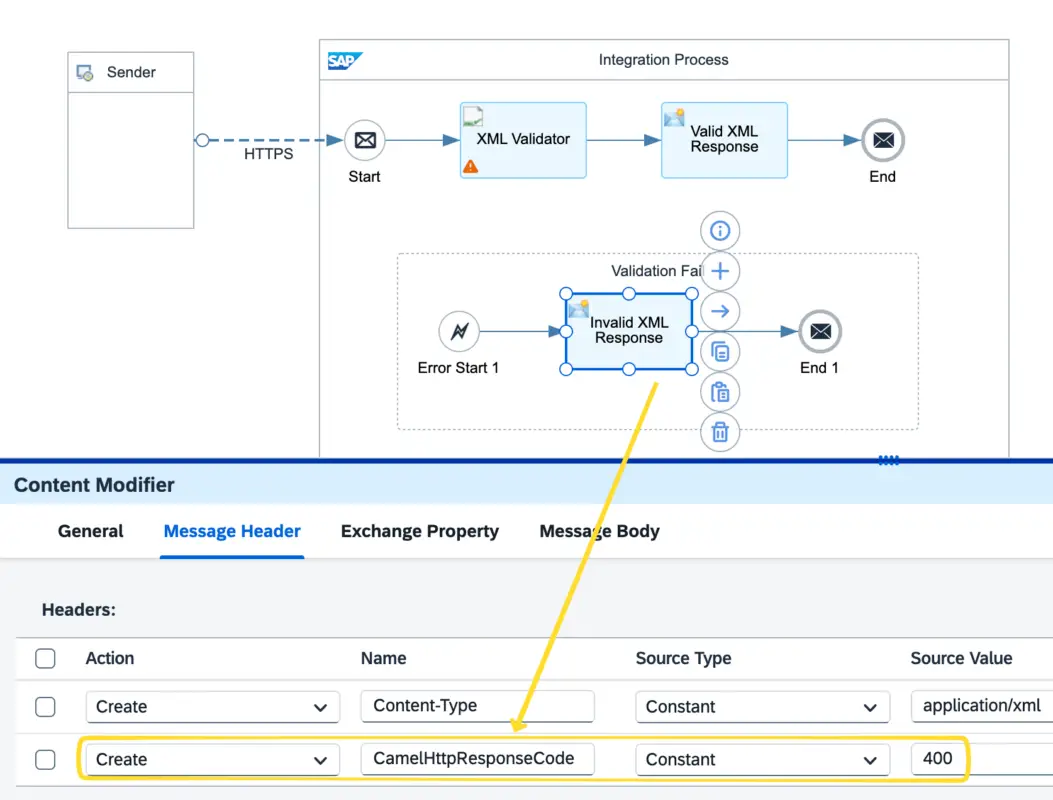
Notice that we will now use the header parameter CamelExceptionCaught instead of SAP_XmlValidationResult. When the exception originates from the XML Validator, CamelExceptionCaught will contain the validation error details, similar to the information previously available in SAP_XmlValidationResult in iFlow Variation 1.
In the main flow, you can continue processing the message for valid XML payloads.

If you test the flow, you will notice that the response sent back to the message sender is the same as in Variation 1. The response body and the HTTP status code are returned to the sender as expected.
How to Easily Identify Messages Where XML Validation Failed?
As you may have noticed, even when XML validation fails, the message status in the Message Monitor still appears as Successful or Completed.
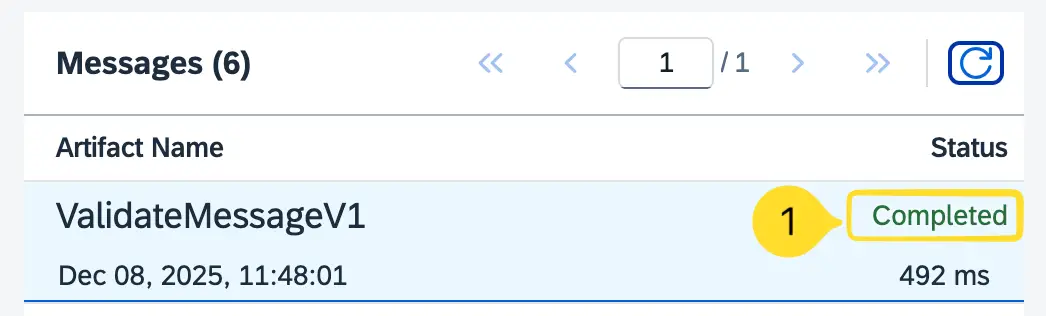
This is unavoidable if you want to send a custom rbody of the message in the response back, such as a meaningful HTTP status code. To achieve this, you must end the message processing with an End Message event, which in turn sets the message status in the monitor to Completed.
This means you cannot rely on the standard status field to differentiate between valid and invalid messages.
So, how can users easily filter messages that failed XML validation?
In such cases, you can make use of the Custom Status feature in SAP Integration Suite. By setting a meaningful value to the parameter SAP_MessageProcessingLogCustomStatus, you can mark messages where validation failed and later filter them in the Message Monitor.
In this example, we will set the value of SAP_MessageProcessingLogCustomStatus to: XMLValidationFailed

Once configured, you can simply use the Custom Status filter in the Message Monitor to quickly identify messages where XML validation did not pass.

What Kind of Payload Validations Can be Done?
You can validate incoming XML files against the XSD, as all the validation rules are defined within the schema. An XML Validator checks the incoming message against the XSD to determine whether it is valid and suitable for processing.
Below are some examples of the types of validations that can be performed using a properly defined XSD:
Optional / Required Elements
Here the order ID element is mandatory, you know that because minOccurs attribute is not set as zero on this field. While elements such as RequiredDate and ShippedDate are optional as both elements have minOccurs=”0″.
So if any of the madatory fields are not avilable validation fails.
    <!-- ========= Header Segment ========= -->
    <xs:complexType name="HeaderType">
        <xs:sequence>
            <xs:element name="OrderID" type="xs:string"/>
            <xs:element name="CustomerID" type="xs:string"/>
            <xs:element name="OrderDate" type="xs:dateTime"/>
            <xs:element name="RequiredDate" type="xs:dateTime" minOccurs="0"/>
            <xs:element name="ShippedDate" type="xs:dateTime" minOccurs="0"/>
            <xs:element name="DocumentCurrency" type="xs:string"/>
            <xs:element name="PurchaseOrderNumber" type="xs:string" minOccurs="0"/>
            <xs:element name="OrderStatus" type="xs:string" minOccurs="0"/>
        </xs:sequence>
    </xs:complexType>
<!-- ===== Order Header ===== -->
<Header>
<OrderID>0001</OrderID>
<CustomerID>VINET</CustomerID>
<OrderDate>1996-07-04T00:00:00Z</OrderDate>
<DocumentCurrency>EUR</DocumentCurrency>
<PurchaseOrderNumber>PO-458922</PurchaseOrderNumber>
<OrderStatus>Confirmed</OrderStatus>
</Header>This is valid although ShippedDate and RequiredDate are not available.
    <!-- ===== Order Header ===== -->
    <Header>
       <CustomerID>VINET</CustomerID>
        <OrderDate>1996-07-04T00:00:00Z</OrderDate>
        <DocumentCurrency>EUR</DocumentCurrency>
        <PurchaseOrderNumber>PO-458922</PurchaseOrderNumber>
        <OrderStatus>Confirmed</OrderStatus>
    </Header>
This is inavlid because the mandatory element OrderID is missing
Data Type Validation
You can check values in each element is in the correct type. For example, OrderDate should be of type dateTime. Order data like this <OrderDate>2025-07-04</OrderDate> would fail because it should a timestamp format with data and time like <OrderDate>2025-07-04T00:00:00Z</OrderDate>.
Here is the exact error raised from XML validator, <OrderDate> does not match the required simple type. Invalid dateTime value “2025-07-04” (Too short).
Here are some of the other Built-in types: xs:string, xs:int, xs:decimal, xs:date, xs:dateTime, xs:boolean, etc.
Message Structure
Notice that each segment under the SalesOrder element must appear in the defined sequence.
If any segment is placed in the wrong order, an error will be raised.
<xs:element name=”SalesOrder”>
<xs:complexType>
<xs:sequence>
<xs:element name=”Header” type=”HeaderType”/>
<xs:element name=”CustomerDetails” type=”CustomerDetailsType”/>
<xs:element name=”ShippingDetails” type=”ShippingDetailsType”/>
<xs:element name=”Items” type=”ItemsType”/>
<xs:element name=”Totals” type=”TotalsType”/>
</xs:sequence>
</xs:complexType>
</xs:element>
For example, if I move the Totals segment to an incorrect position, you will see this validation error.
In content of element
 <SalesOrder>: The content model does not allow element
 <Q{}Totals> to appear immediately after element
 <ShippingDetails>. It must be preceded by
 <Q{}Items>.
Following are other types of structure rules you can apply in the XSD.
<xs:all>→ all elements present in any order<xs:sequence>→ elements must appear in order<xs:choice>→ only one element out of many
Pattern Validation
Lets say you want to make sure the email is a valid email. You can make assign a pattern in the XSD.
<xs:element name=”Email” minOccurs=”0″>
<xs:simpleType>
<xs:restriction base=”xs:string”>
<xs:pattern value=”[a-zA-Z0-9._%+-]+@[a-zA-Z0-9.-]+\.[a-zA-Z]{2,}”/>
</xs:restriction>
</xs:simpleType>
</xs:element>
Then if the email is not in the expacted pattern with @ sign, it will though an error. Such kind of data that should adhere to a defined pattern like a address, email, phone number, etc can be defined in the XSD.
Enumeration
Using Enumeration rules, you can check if the data is valid againist a list of values allowed for that element.
Now lets check if the OrderStatus value comply with the list of allowed statuses.
<xs:simpleType name="OrderStatusEnum">
    <xs:restriction base="xs:string">
        <xs:enumeration value="New"/>
        <xs:enumeration value="Pending"/>
        <xs:enumeration value="Processing"/>
        <xs:enumeration value="Shipped"/>
        <xs:enumeration value="Delivered"/>
        <xs:enumeration value="Cancelled"/>
        <xs:enumeration value="Returned"/>
        <xs:enumeration value="On Hold"/>
    </xs:restriction>
</xs:simpleType>

<!-- ========= Header Segment ========= -->
<xs:complexType name="HeaderType">
    <xs:sequence>
        <xs:element name="OrderID" type="xs:string"/>
        <xs:element name="CustomerID" type="xs:string"/>
        <xs:element name="OrderDate" type="xs:dateTime"/>
        <xs:element name="RequiredDate" type="xs:dateTime" minOccurs="0"/>
        <xs:element name="ShippedDate" type="xs:dateTime" minOccurs="0"/>
        <xs:element name="DocumentCurrency" type="xs:string"/>
        <xs:element name="PurchaseOrderNumber" type="xs:string" minOccurs="0"/>
        <xs:element name="OrderStatus" type="OrderStatusEnum" minOccurs="0"/>
    </xs:sequence>
</xs:complexType>
If you send a value that is not the list it will error out. Allowing you to check for valid values
<OrderStatus>Confirmed</OrderStatus>
The content "Confirmed" of element <OrderStatus> does not match the required simple type. Value "Confirmed" contravenes the enumeration facet "Returned, New, Delivered, On H..." of the type Q{}OrderStatusEnumMin/Max Values (Numeric or Length)
The following rules allow you to check whether numeric values fall within an allowed range, such as a minimum or maximum value. You can also validate the length of a string value in a similar way.
- Numeric:
xs:minInclusive,xs:maxInclusivexs:minExclusive,xs:maxExclusive
- String length:
xs:minLength,xs:maxLength
<xs:element name="Quantity">
    <xs:simpleType>
        <xs:restriction base="xs:decimal">
            <xs:minInclusive value="1"/>
            <xs:maxInclusive value="1000"/>
        </xs:restriction>
    </xs:simpleType>
</xs:element>
Workaround to Validate JSON and Other Message Formats
The XML Validator works only for XML. So what is the incoming message is a JSON payload?
Although there is no native palette step for JSON structure validation, as a workaround you can:
- Convert the JSON to XML using the JSON → XML Converter
- Create an XSD that represents the structure of the message
- Validate the converted XML using the XML Validator
This approach allows you to validate JSON messages using the same mechanism as XML.

Now let’s send an JSON message to the iFlow.

You can also write a Groovy script for JSON validation but custom logic should be implemented. Advantage of using the XML validator for JSON messages is that you can use standard features witout creating complex Groovy Scripts.
The downside of this workaround is that the error details will be displayed as XML elements.
Summary
Message validation is a crucial part of any integration flow. Implementing it correctly ensures quality, prevents runtime issues, and helps sender systems quickly correct and resend bad messages.
- Use middleware for structural validation
- Use the receiver for business validation
- SAP Integration Suite provides XML and EDI validators out of the box
We explored the configuration options in the XML Validator and different variations for using the XML Validator palette options. You can handle invalid XML messages either in the Exception Subprocess or by using an appropriate Router Exception. We also looked at some of the rules you can define in the XSD to validate the incoming XML.
In addition, we also looked at how to use a Custom Status to indicate which messages have failed, as well as a workaround for validating incoming JSON messages.
Hope you enjoyed the article! If you’d like to learn SAP Integration with me, check out my Online Course on SAP Integration Suite.

Encode Message Payload to Base64 on CPI!
How to use Base64 message encoder in SAP Integration Suite.
Subscribe for moreMy First Interface on CPI!
Learn how to develop your first iFlow on SAP Integration Suite within 7 minutes!
Subscribe for moreSIGN UP TODAY!
Sign up to receive our monthly newsletter and special deals!