
In this article, let’s look at the Idempotent Process Call in SAP Integration Suite. Before we explore an example of how to implement it, let’s first understand the concept of idempotency in computing and system integration.

What Is Idempotency? Definition and Explanation
In computing and system integration, an operation is called idempotent if performing it multiple times produces the same result as performing it once.
In other words, even if the operation is repeated, intentionally or due to retries, network issues, or user error, the final state of the system remains unchanged beyond the effect of the first execution.
To make this concept clearer, let’s look at a simple real-world scenario.
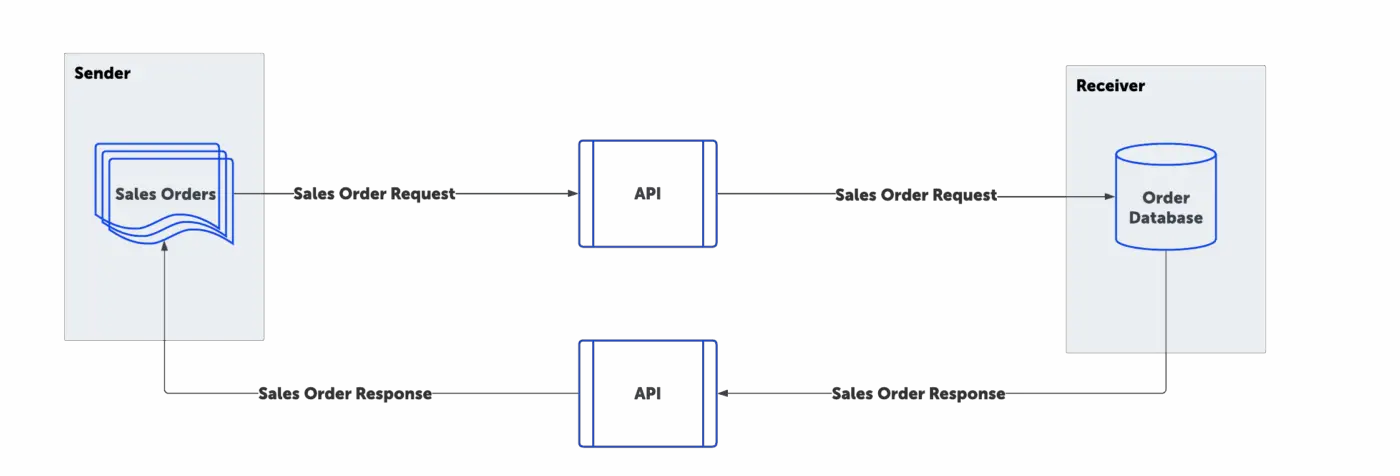
Imagine an e-commerce application that sends sales orders to a backend database or ERP system.
In the ideal or “happy” flow, the e-commerce portal sends the order, the receiver successfully creates the order in the backend system, and then sends an acknowledgment back to the e-commerce application.
In this perfect situation, everything works exactly as expected.
But what happens if the acknowledgment is not received by the sender, even though the backend system actually received and created the order?
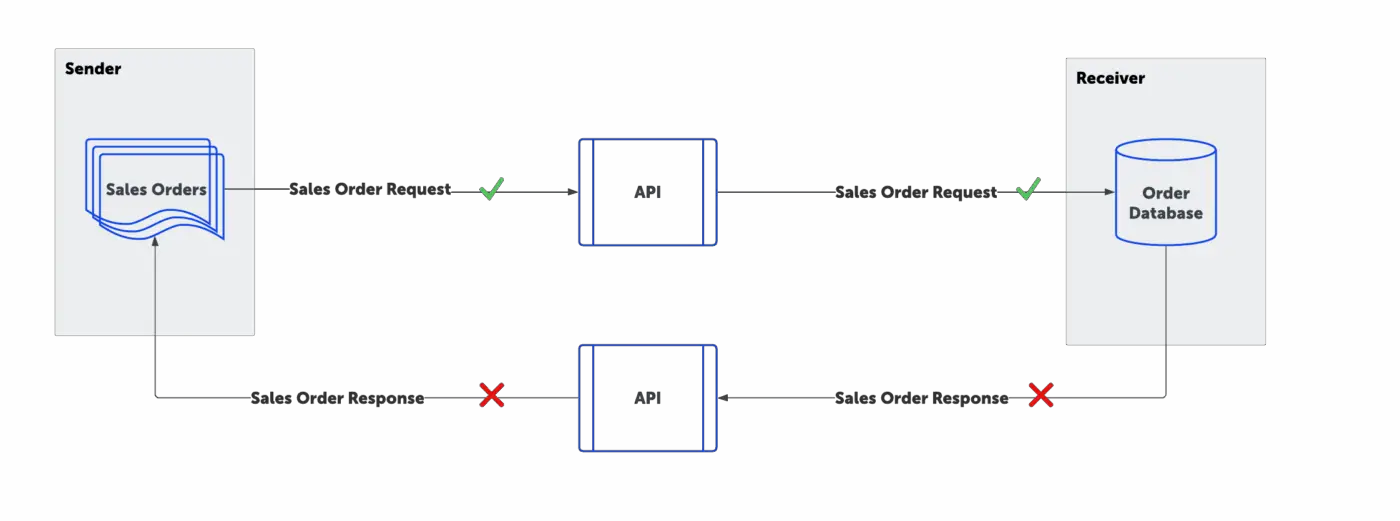
In this situation, the sender has no way of knowing whether the order was created successfully or not.
As a result, the sender will naturally try to send the message again.
Now imagine a frustrated user repeatedly clicking the Submit button because they think the order didn’t go through, simply because they never received a confirmation. If each of those clicks creates a new sales order in the backend system, the outcome would be a complete disaster.
And this issue isn’t limited to user actions; many systems have automatic retry mechanisms.
When they fail to receive the expected response, they will resend the message, often multiple times.
This is why it is essential to detect and handle duplicate messages.
This is exactly what we mean when we talk about making a process idempotent: the Backend system should not create new sales orders after the first operation. The interface should identify duplicate messages and prevent them from being processed again.
Only the first valid message should be processed. Any subsequent duplicates should be safely ignored.
Which HTTP Methods Are Idempotent?
When working with HTTP calls, it’s important to understand which methods are idempotent, meaning which methods do not change the result even if they are executed multiple times.
GET Method
Take the GET method, for example. If you send a request to retrieve sales order information from a database, the sender provides the order ID and receives the corresponding order details. Even if the same GET request is sent repeatedly, nothing in the database changes; you are just reading the data, not altering the data. The data in the backend system remains exactly the same. That’s why the GET method is considered idempotent; multiple identical requests do not alter the result of the system.
POST Method
Now, let’s look at POST. A POST request is typically used to create a new resource, in our scenario, a new sales order in the backend system or database. If the same POST request is sent multiple times, it creates multiple orders, changing the system each time. Therefore, POST is not idempotent.
DELETE Method
On the other hand, DELETE is idempotent. You can only delete a resource once. The first DELETE request removes the order; any subsequent DELETE requests for the same order do not make further changes to the database. The system state remains the same after the first deletion.
The same principle applies to other HTTP methods that do not alter the system after their initial execution; they are considered idempotent, because repeated calls do not lead to additional changes.
What Is an Idempotent Receiver?
So, what if the message receiver system itself can identify duplicate messages?
For this to work, each message must include a unique identifier. In our example, this could be the Sales Order ID, which is unique for every order.
The Sales Order ID is assigned by the sender system. When the message reaches the receiver, the receiver can check this ID for uniqueness. If the ID has never been processed before, the receiver processes the order and saves it to the database. It should also store that ID in memory or in a table, so that it can compare future incoming messages against it.
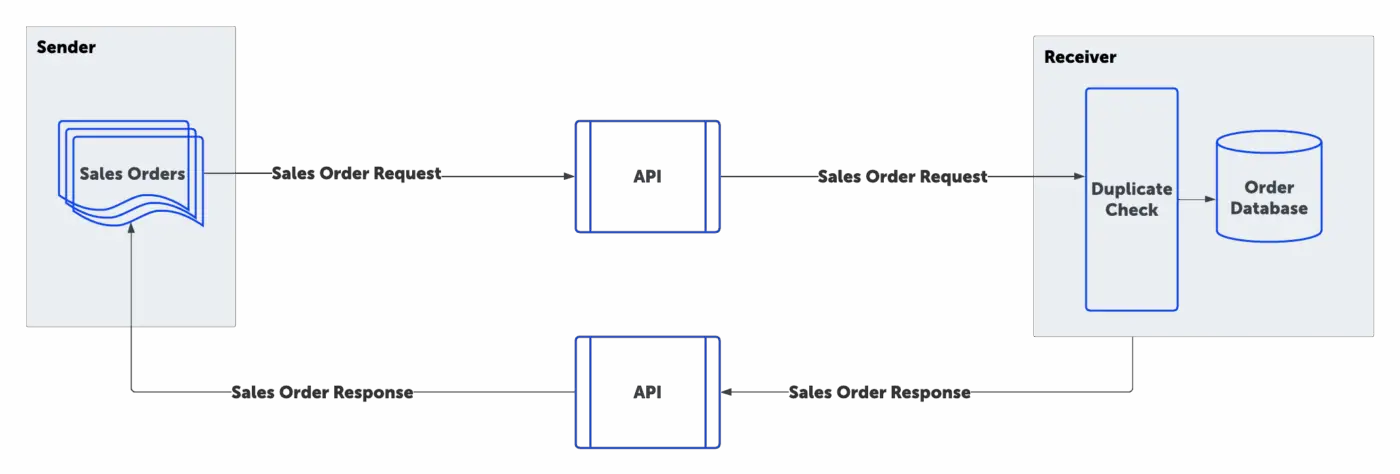
If a message arrives with an ID that has already been processed, the receiver simply ignores it. In this way, the receiver behaves as an idempotent receiver, capable of safely handling duplicate messages.
However, not all receivers are built this way. Some systems cannot handle duplicates and are considered non-idempotent. In such cases, the middleware must take responsibility for ensuring idempotency.
This is where the Idempotent Process Call feature in SAP Integration Suite comes into play. It allows the middleware to detect and handle duplicates before they even reach the backend system, ensuring reliable and consistent processing.
When to Use the Idempotent Process Call in SAP Integration Suite
In cases where the backend system is non-idempotent, it cannot detect or manage duplicate messages on its own. Or if the HTTP method used is non-idempotent. That’s where the middleware must take responsibility.
As discussed earlier, a unique ID is required to identify duplicates. In our scenario, the unique reference is the Sales Order ID included in the order XML.
This ID serves as the key for the middleware to check whether a message has already been processed. If the middleware encounters this Sales Order ID for the first time, it allows the message to pass through to the backend system.
If the same ID appears again, whether due to network retries, system errors, or users clicking “Submit” multiple times, the middleware can safely ignore the duplicate message.
By implementing this check, the middleware ensures that the backend system receives each order only once, even if the message has been sent multiple times.
Prerequisites for Using the Idempotent Process Call in SAP Integration Suite
One of the prerequisites for using the Idempotent Process Call in SAP Integration Suite is that we must have a unique ID to identify each message (or iteration). This ID is then used to detect duplicates and ignore any subsequent duplicate messages associated with that same ID.
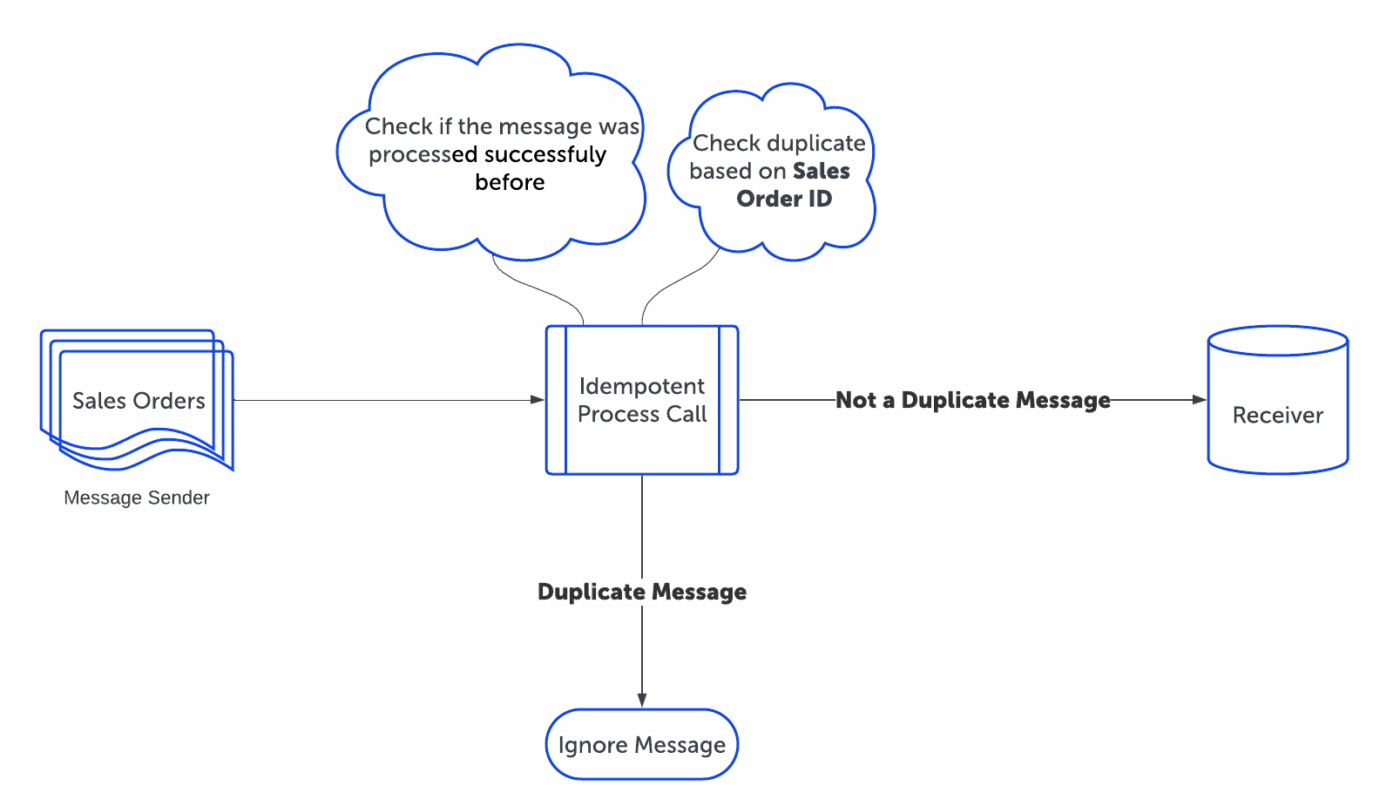
This unique ID can be taken from the payload, or it can be a technical ID generated by the sender adapter — such as a UUID, GUID, Transaction ID, etc.
In simple terms, it just needs to be unique for every incoming request.
Example: Idempotent Process Call Flow in SAP Integration Suite
Now let’s look at a real-life example with the sales order scenario we looked at earlier.
Here is the incoming message format.
<?xml version="1.0" encoding="UTF-8" ?>
 <Order>
     <OrderID>10250</OrderID>
     <CustomerID>VINET</CustomerID>
     <EmployeeID>5</EmployeeID>
     <OrderDate>1996-07-04T00:00:00Z</OrderDate>
     <RequiredDate>1996-08-01T00:00:00Z</RequiredDate>
     <ShippedDate>1996-07-16T00:00:00Z</ShippedDate>
     <ShipVia>3</ShipVia>
     <Freight>32.38</Freight>
     <ShipName>Vins et alcools Chevalier</ShipName>
     <ShipAddress>59 rue de l'Abbaye</ShipAddress>
     <ShipCity>Reims</ShipCity>
     <ShipRegion></ShipRegion>
     <ShipPostalCode>51100</ShipPostalCode>
     <ShipCountry>France</ShipCountry>
 </Order>
Our unique ID is the Sales Order ID. We should process each sales order only once, meaning it should be sent to the backend system only a single time. Any subsequent messages with the same Sales Order ID should be ignored.
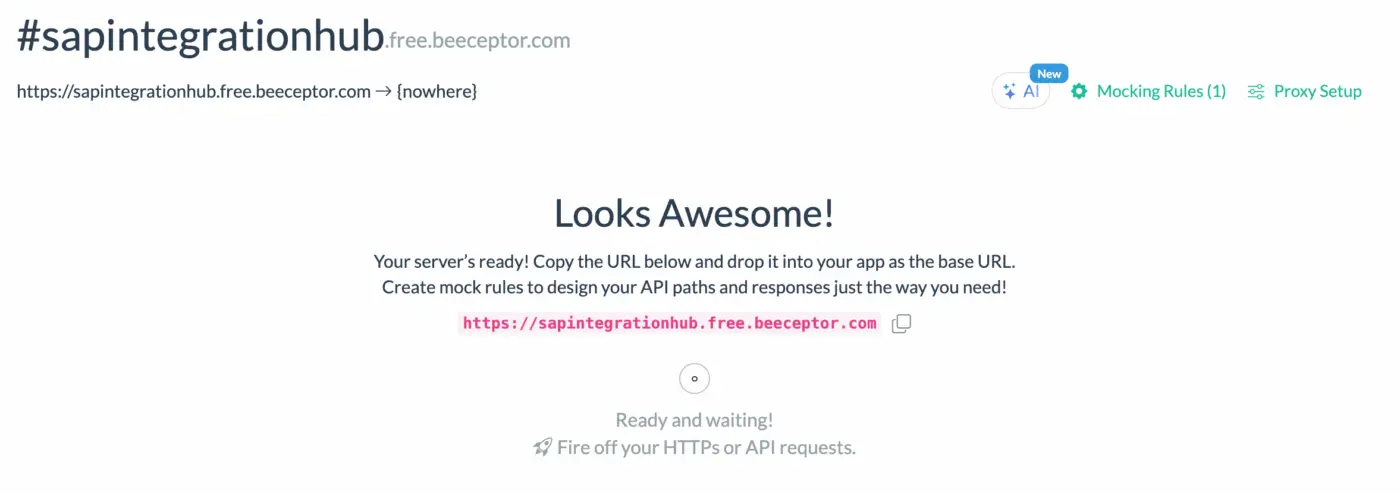
For the receiver system, I created a webhook on Beeceptor, which sends back an acknowledgment whenever it receives an order. It works as a ready-to-use mock server that requires no setup or signup. You can use Beeceptor to tailor response payloads, adjust status codes, reuse request parameters, and shape mocks from your OpenAPI specifications. This is the fastest way I have found to validate message flows before connecting to real downstream systems.
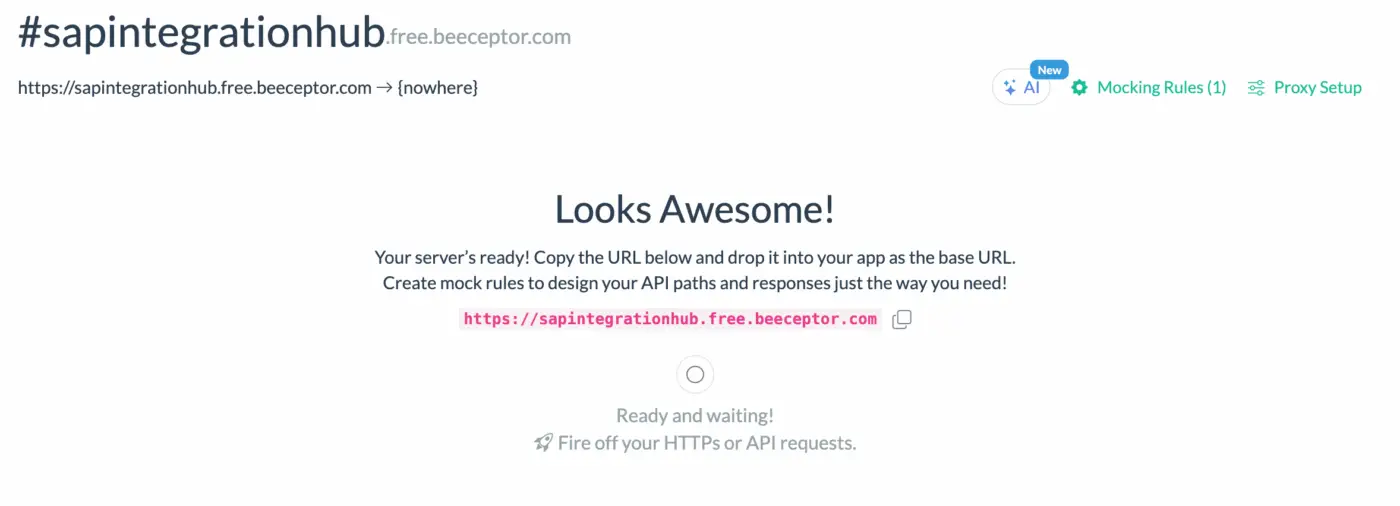

As you can see, the webhook does not check for duplicate orders; it simply accepts every message that arrives. We can imagine that it would create a new order each time a message is received.
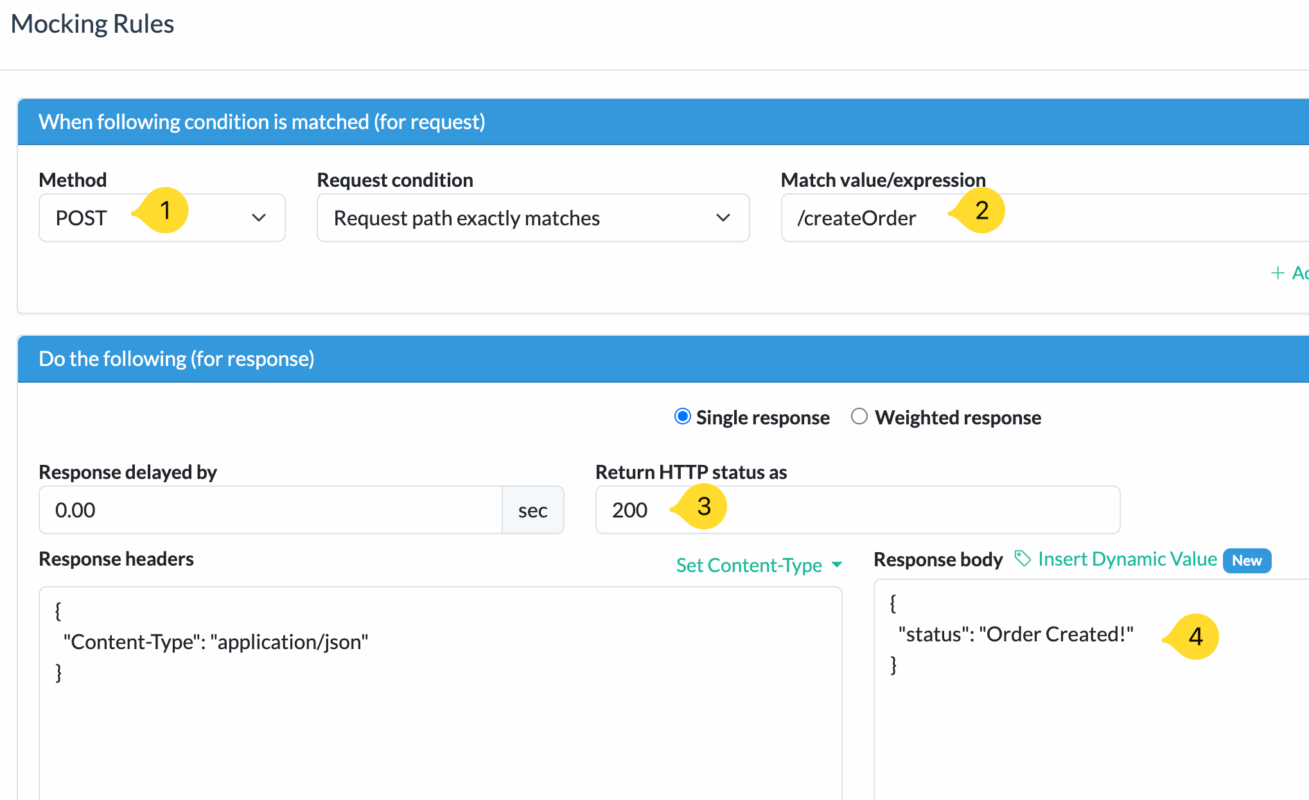
Therefore, the middleware must handle duplicates and safely ignore them, ensuring that no duplicate messages are sent to the webhook receiver.
Develop an iFlow with an Idempotent Process Call in SAP Integration Suite
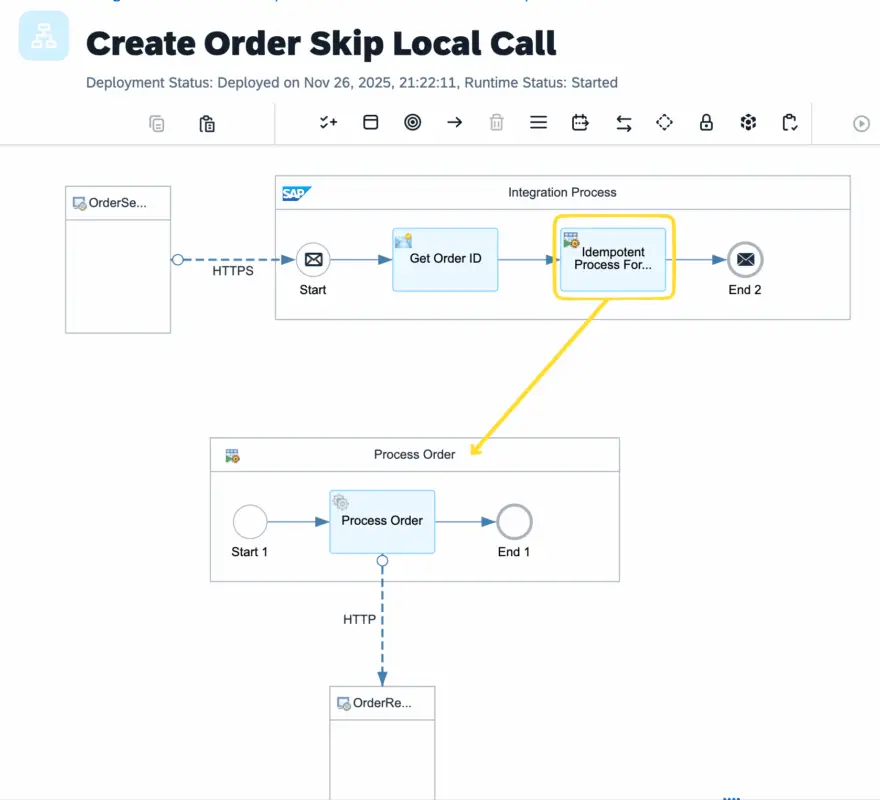
Create a Local Integration Process that sends the message to the receiver. In this case, the sales order message is sent to the webhook. This Local Integration Process will be called by the Idempotent Process Call.
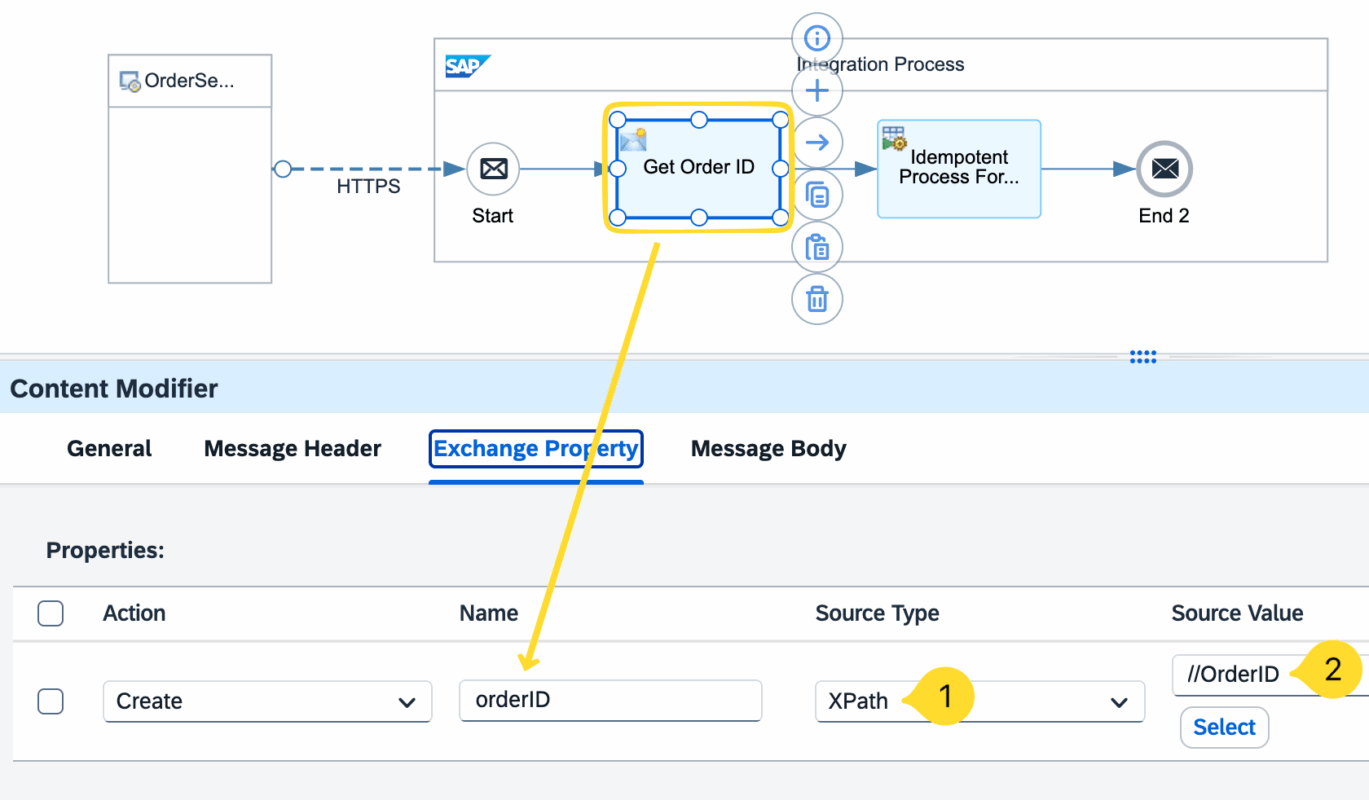
Extract the unique ID, which is the sales order ID, using an XPath expression from the payload.
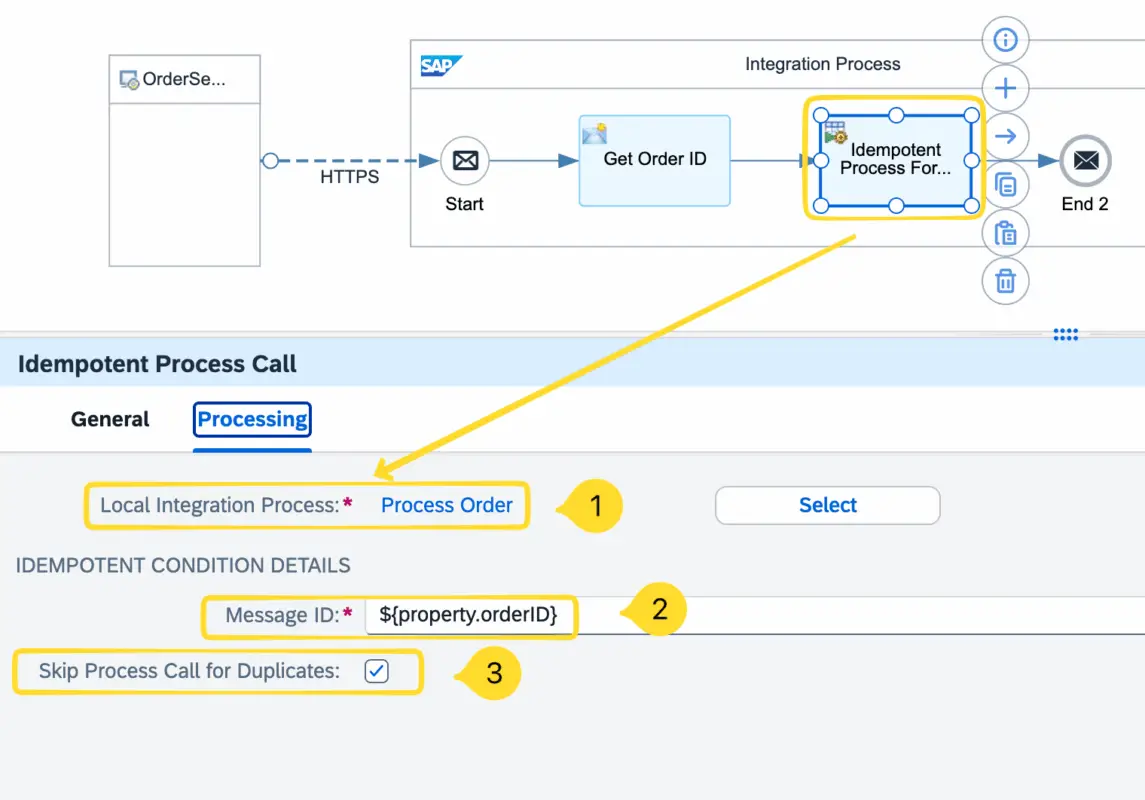
Configure the Idempotent Process Call using the Local Integration Process and Unique Message ID options.
For this scenario, let’s keep Skip Process Call for Duplicates enabled. This means that when the message reaches the Idempotent Process Call, if it is identified as a duplicate based on the Message ID, the local integration process will not be triggered.
Now, let’s test the interface.
Send a unique message, for example, a new sales order.
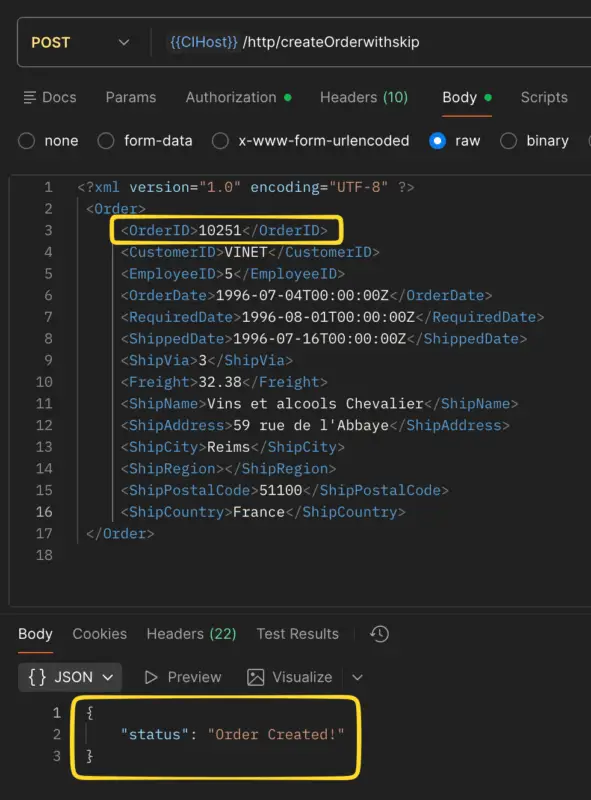
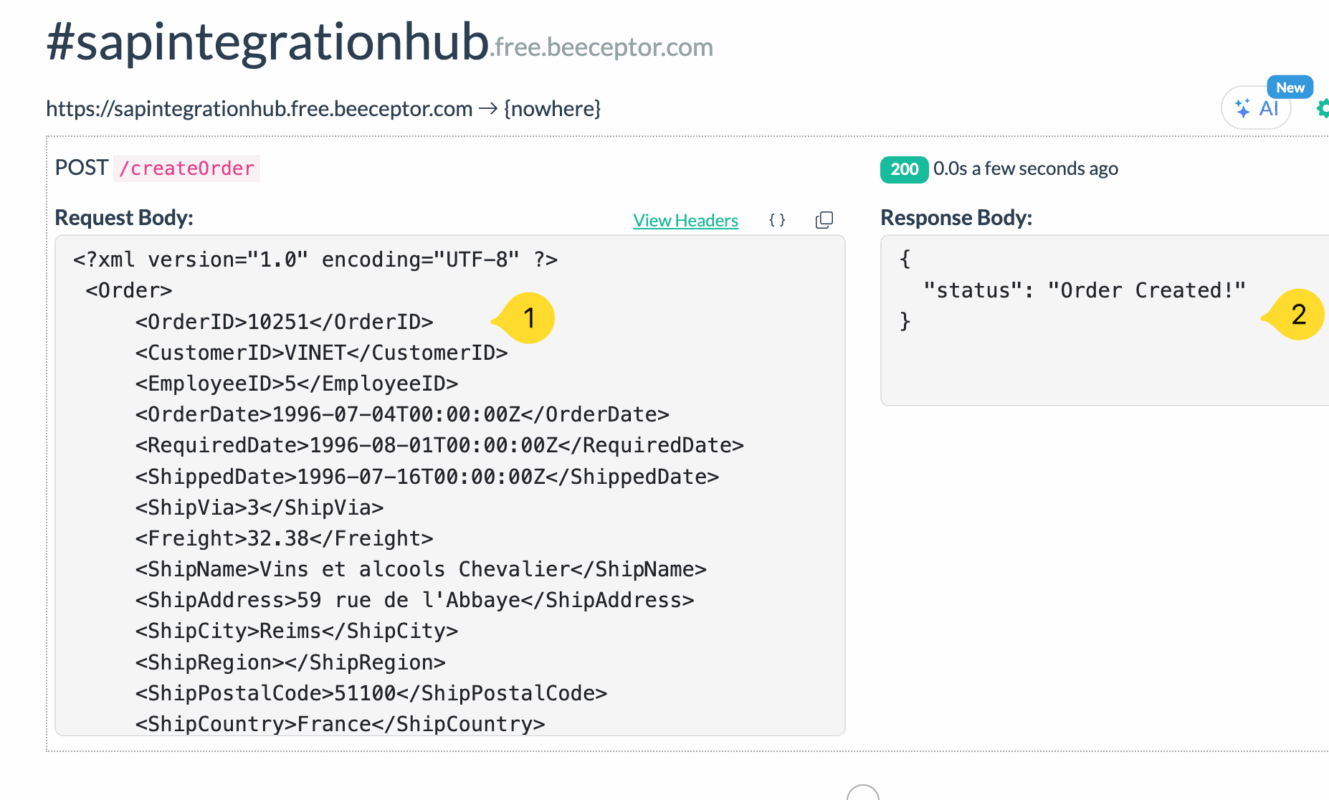
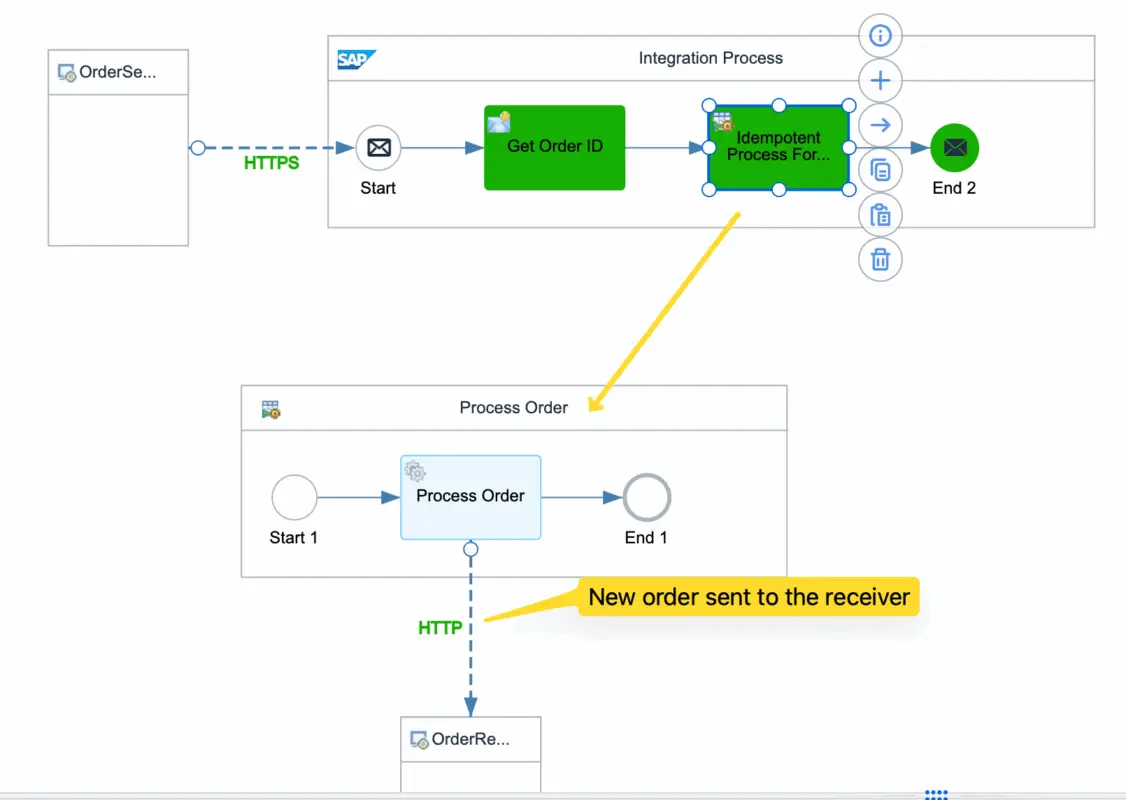
Lets send a duplicate message, the same order.
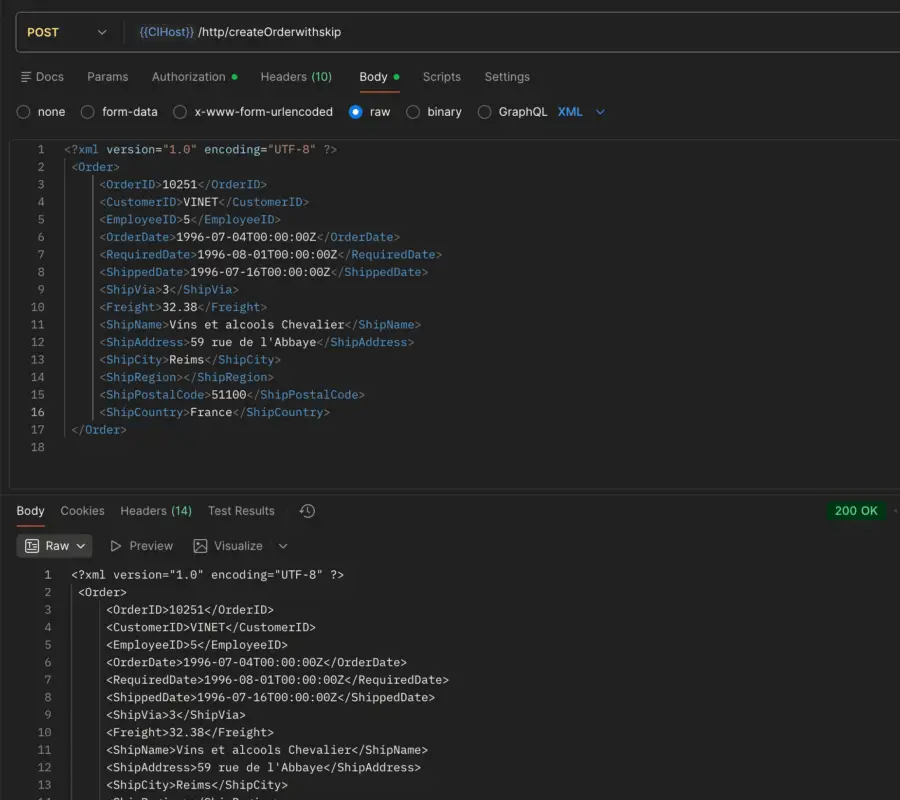
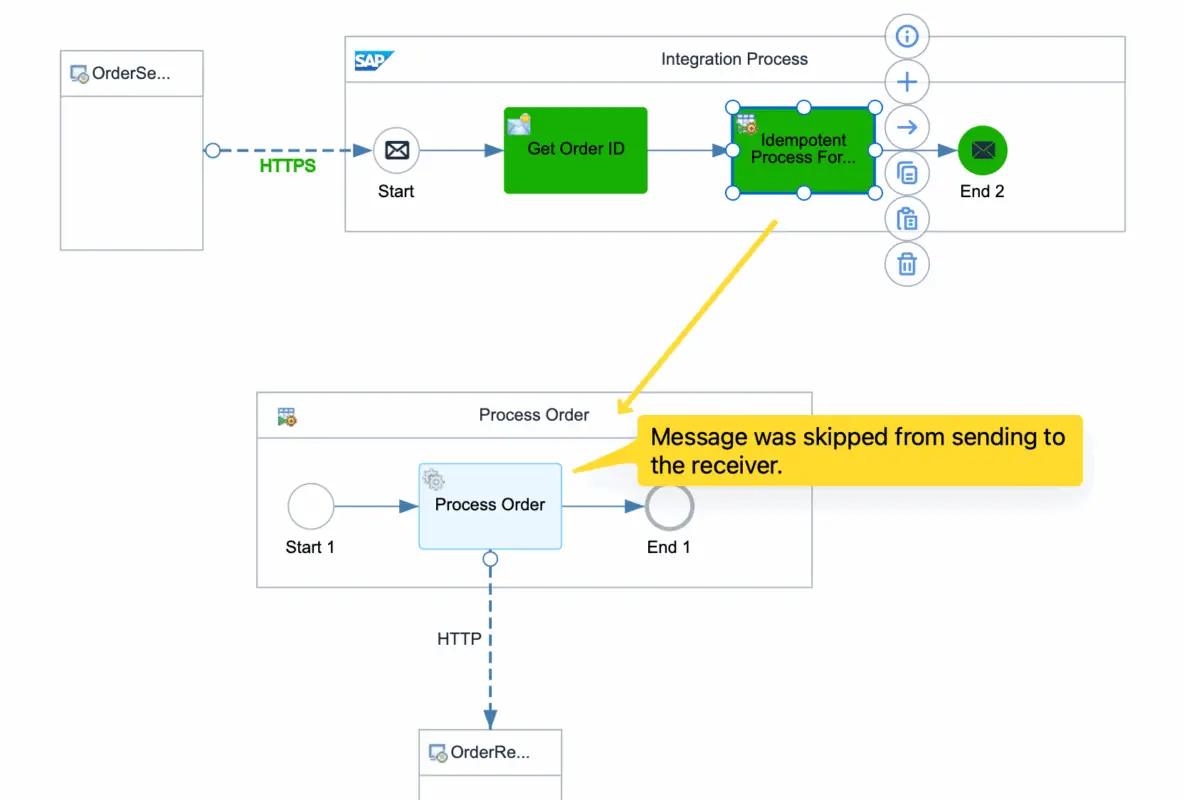
Notice that the Idempotent Process Call skips the local Process Call being executed.
Use of CamelDuplicateMessage and Customize Duplicate Handling
In the previous flow, we explored the Idempotent Process Call with the option “Skip Process Call for Duplicates” enabled. Notice that when this option is selected, the local process call is not executed for duplicate entries.
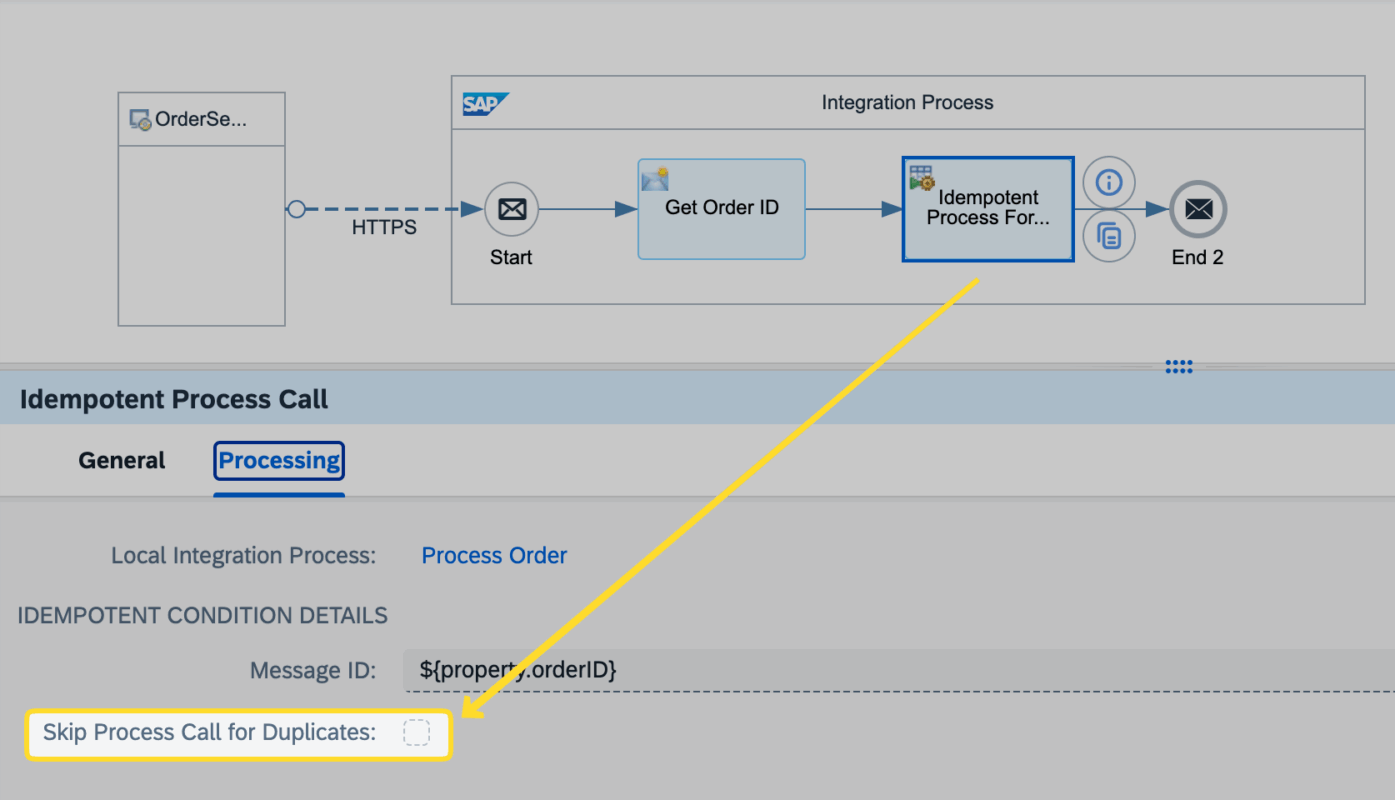
However, you can also deselect the “Skip Process Call for Duplicates” option and handle duplicates manually by using the exchange header property CamelDuplicateMessage. When this option is deselected, the local integration process will be executed even for duplicate messages, which means you must implement your own duplicate-handling logic.
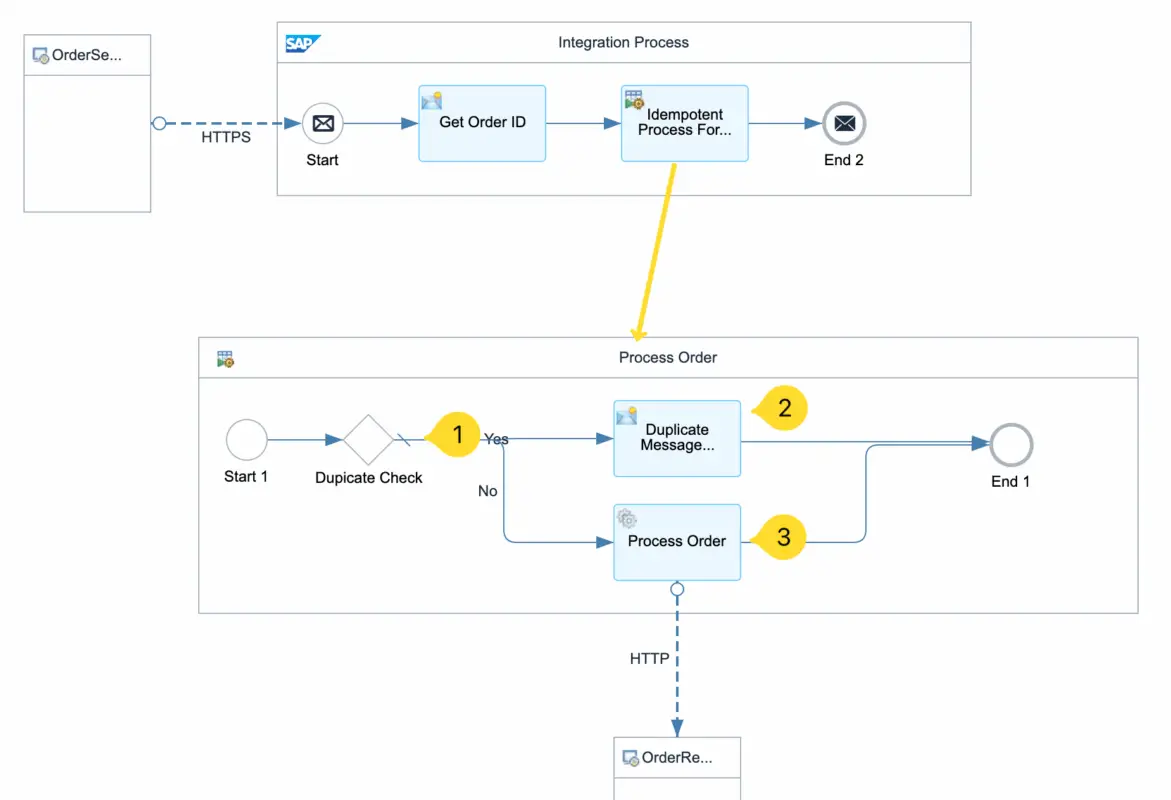
If the Idempotent Process Call detects that a message is a duplicate based on the unique Sales Order ID, the CamelDuplicateMessage header will be set to true. If it is not a duplicate, the value will be false.
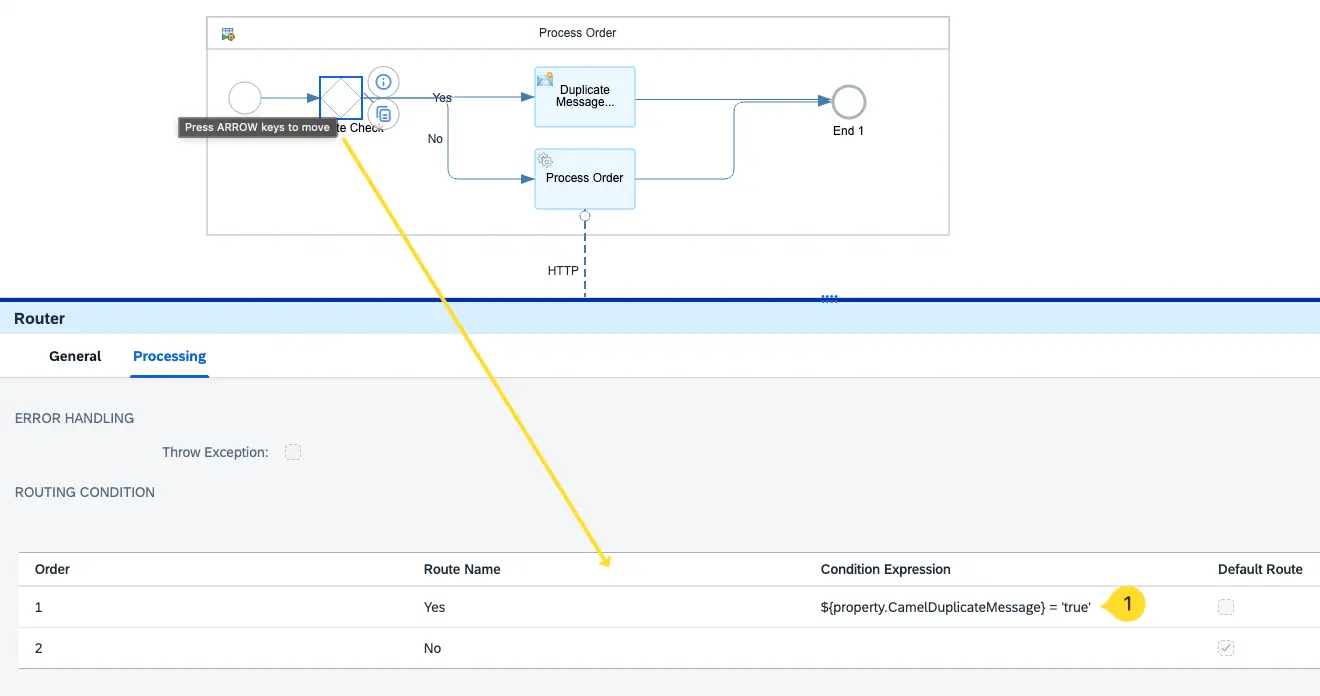
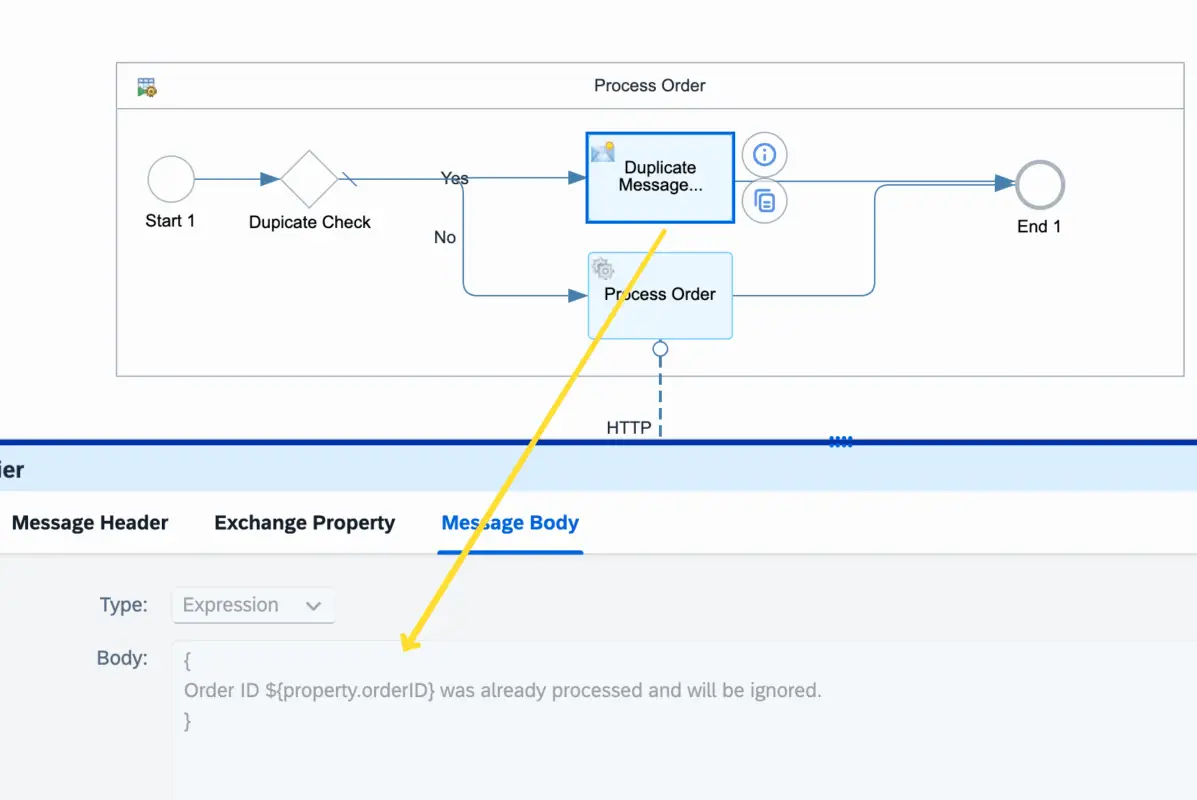
In this example, I will use a Router to check whether the message is a duplicate. If it is, I will return a message to the sender stating: “Order ID XXX was already processed and will be ignored.”
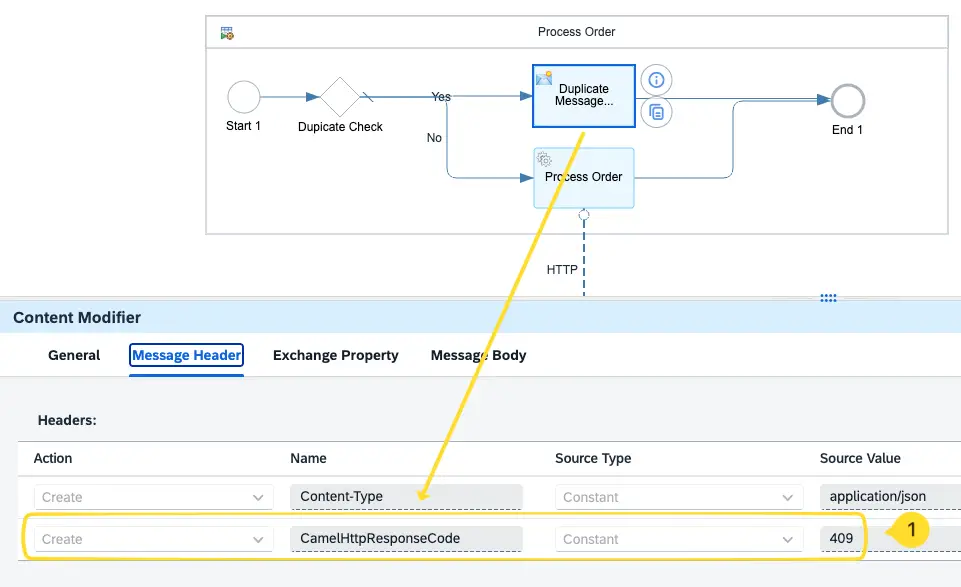
Additionally, we will send a meaningful HTTP 4XX response back to the sender to indicate that the message is a duplicate using the header parameter CamelHttpResponseCode. For this scenario, I will use the HTTP response code 409 (Conflict) to clearly signal that the request conflicts with an already processed order.
Now let’s test the interface with the customized behavior.
First, we send a new sales order.
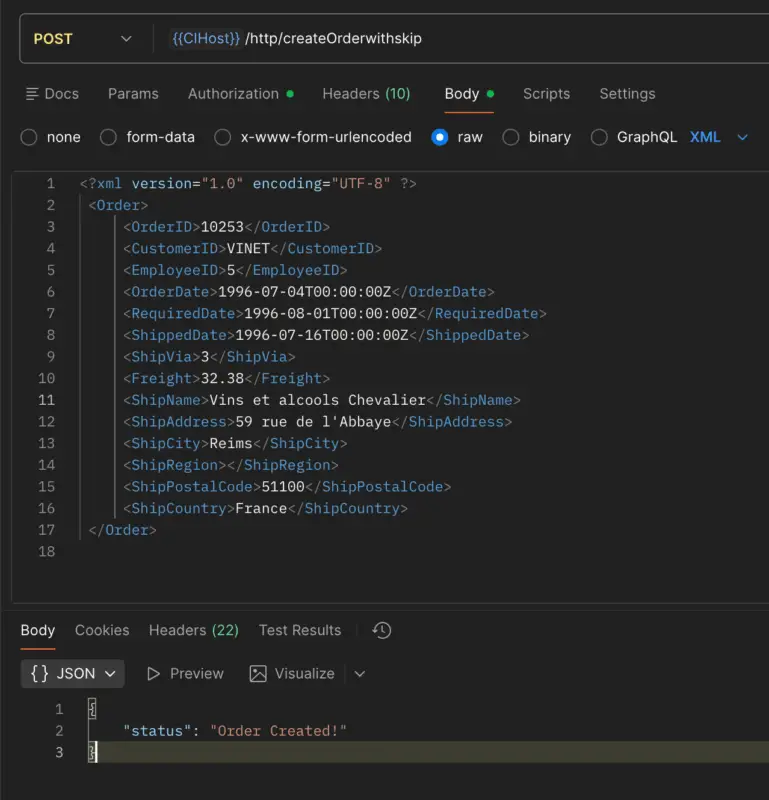
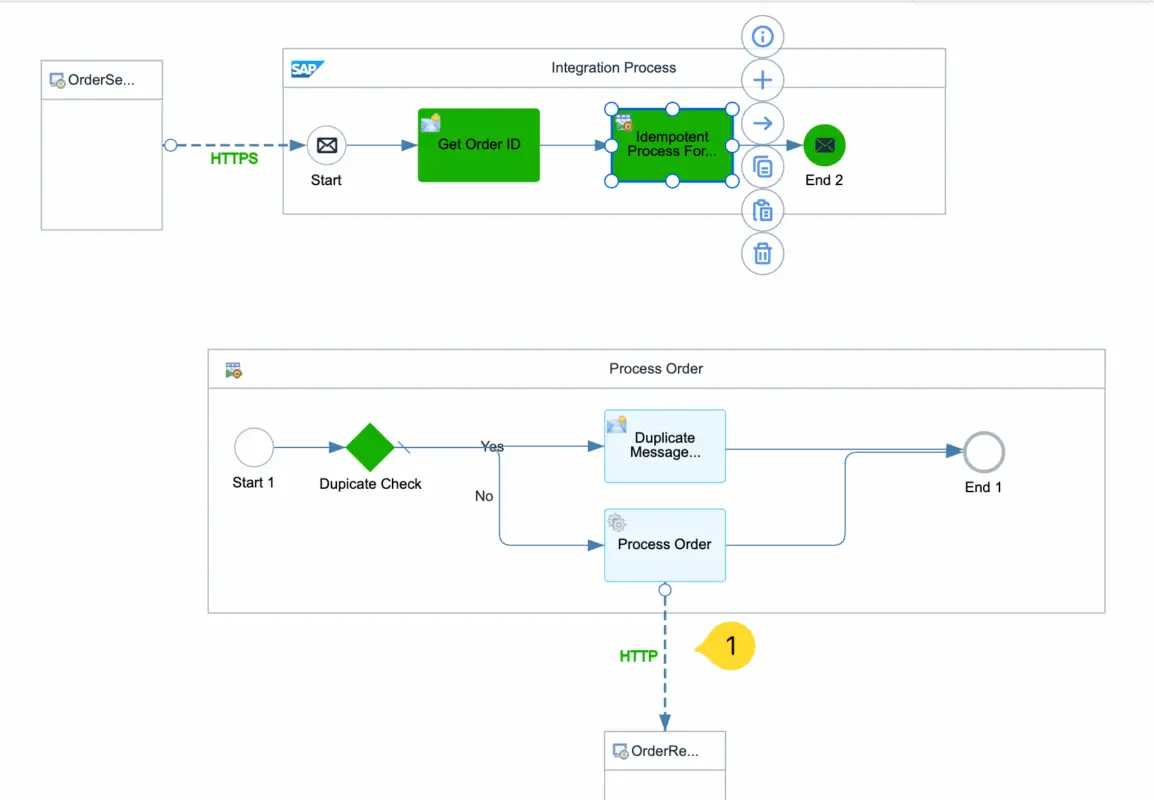
Then, let’s try sending the same sales order again.
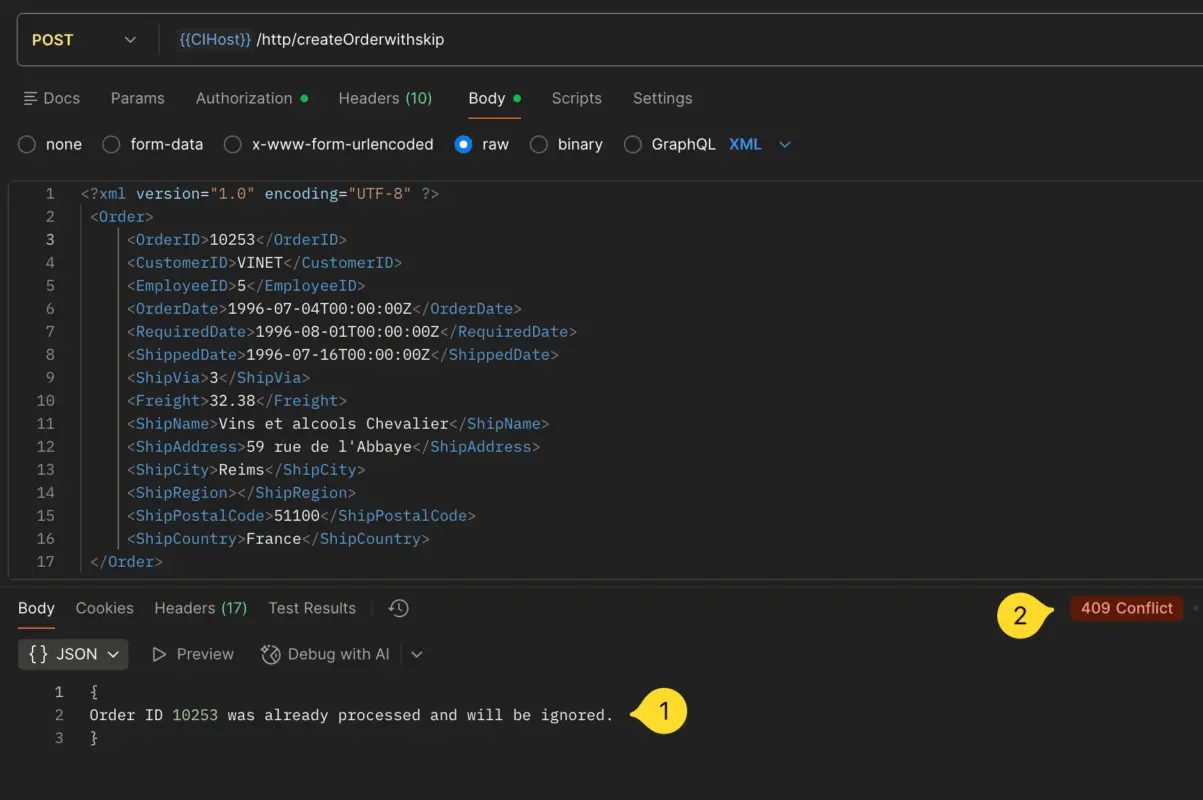
Notice that the response body is meaningful, and the 4xx HTTP status code clearly indicates a bad request due to a conflict. Of course, you can use other 4xx HTTP response codes based on your design preference.
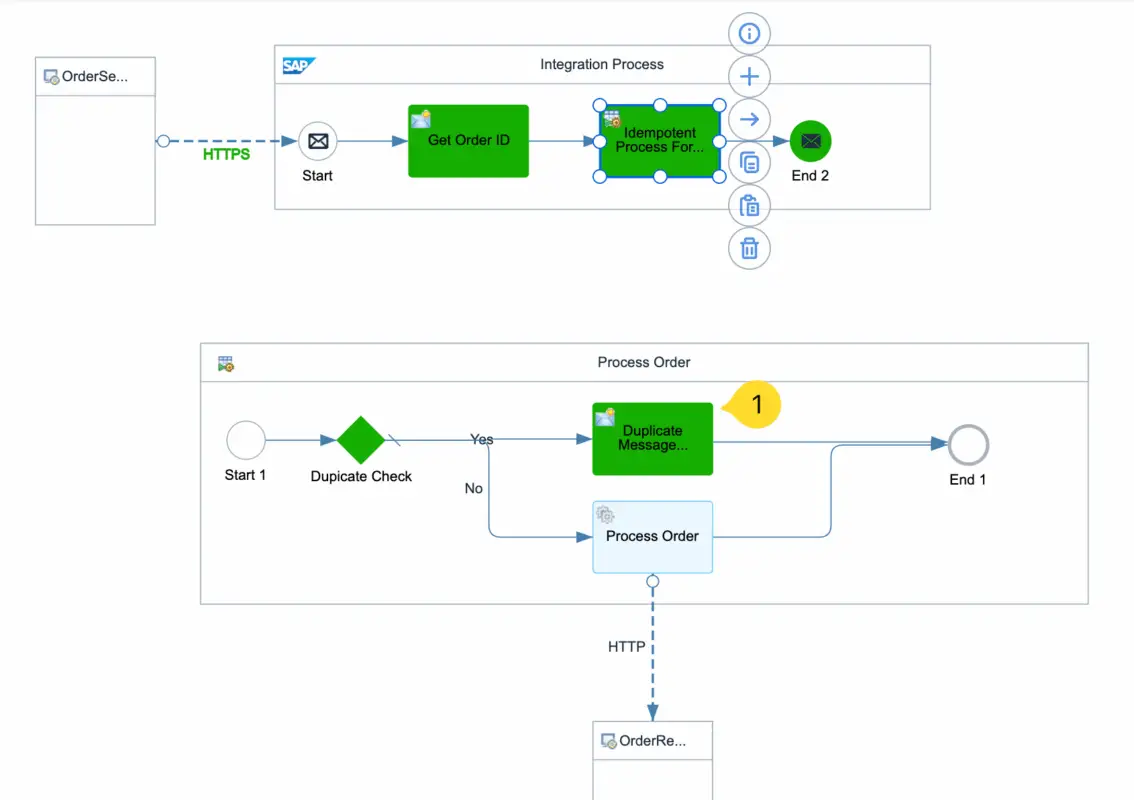
Idempotent Repository and Validity Period
The Idempotent Process Step identifies whether a message is a duplicate by storing the unique Message ID (configured under the Message ID option) in the tenant’s Idempotent Repository, in our example, this is the Sales Order ID.
When a new request arrives, SAP Integration Suite checks whether this ID already exists in the repository. If it does, the message is considered a duplicate, and the Local Integration Process is skipped.
Keep in mind the 90 days rule!
However, note that the idempotent repository data is retained for 90 days only. After 90 days, the stored Message IDs are removed, meaning duplicate checks can only be performed within a 90-day window from the first message execution. In most real-world scenarios, this time frame is more than sufficient — just keep this in mind when designing your interfaces.
I hope you learned something new from this article. We explored the concept of Idempotency in system integration, compared idempotent vs non-idempotent HTTP calls, and discussed when it’s necessary to handle duplicate requests in the middleware. Especially when the receiver system is not idempotent.
Additionally, we walked through an end-to-end iFlow example, covering how to build an iFlow using the Idempotent Process Call, along with its configuration steps. We also looked at how to send a meaningful response back to the sender when a duplicate or invalid request occurs, using appropriate 4xx HTTP response codes.
If you would like to learn SAP Integration Suite with me, I’ve created an online course with 200+ video lessons. Check out the syllabus and sign up to become a confident SAP Integration Consultant.


is idempotent process call feasible in case of JMS queue
Yes you can